Magento MCP server
AI Agents: a Magento 2 MCP server with approval and undo
AI Agents is a Magento 2 module that runs an MCP server inside your store, so an AI app such as Claude can work in the admin signed in as one of your admin users and limited to that user's role.
AI Agents
$119€115£95Black Friday price
$179€169£145Black Friday price
$259€245£211Black Friday price
One-time, per live store. Plus VAT or sales tax where it applies.
30-day refund, no questions asked.
Card purchases are sold by Link, Stripe's merchant-of-record service, which handles the tax. PayPal purchases are sold by Big Cart Energy, with our own invoice. No card number is typed on this site.
Black Friday price through Dec 1, 2026 (Pacific time) or the 25th order at this price, whichever comes first. Then $139.Black Friday price through Dec 1, 2026 (Pacific time) or the 25th order at this price, whichever comes first. Then €135.Black Friday price through Dec 1, 2026 (Pacific time) or the 25th order at this price, whichever comes first. Then £109.
Black Friday price through Dec 1, 2026 (Pacific time) or the 25th order at this price, whichever comes first. Then $199.Black Friday price through Dec 1, 2026 (Pacific time) or the 25th order at this price, whichever comes first. Then €189.Black Friday price through Dec 1, 2026 (Pacific time) or the 25th order at this price, whichever comes first. Then £159.
Black Friday price through Dec 1, 2026 (Pacific time) or the 25th order at this price, whichever comes first. Then $279.Black Friday price through Dec 1, 2026 (Pacific time) or the 25th order at this price, whichever comes first. Then €265.Black Friday price through Dec 1, 2026 (Pacific time) or the 25th order at this price, whichever comes first. Then £225.
What you get
- Tested on Magento 2.3.0 to 2.4.9 and Mage-OS.
- Tested on Magento 2.3.5-p2 to 2.4.9 and Mage-OS.
- Tested on Magento 2.3.5-p2, 2.4.8 and 2.4.9.
- One live store, plus its staging, test and development copies.
- A year of updates; what you have keeps working after.
- In your account as soon as your payment clears: Composer or zip.
- One license per item, all starting the day you buy, each renewed separately.
- One license per item, all starting the day you buy, each renewed separately.
1.0.0released Changelog
- Tested on Magento 2.3.0 to 2.4.9 and Mage-OS
- Approval, preview and undo
- Installed switched off, no license check
- One-time purchase, a year of updates
On this page
AI Agents · $119€115£95 US dollars, one-time, before taxeuros, one-time, before taxpounds sterling, one-time, before tax
AI Agents and Catalog Completeness · $179€169£145 US dollars, one-time, before taxeuros, one-time, before taxpounds sterling, one-time, before tax
AI Agents, the add-on and Catalog Completeness · $259€245£211 US dollars, one-time, before taxeuros, one-time, before taxpounds sterling, one-time, before tax
AI Agents at a glance
What it is
- Product
- AI Agents by Big Cart Energy
- Type
- Magento 2 module, two Composer packages: the server and the expert tools
- Tested on
- Magento Open Source 2.4.9, 2.4.8, 2.4.6, 2.4.5, 2.4.0, 2.3.7-p4, 2.3.5-p2, 2.3.0; Mage-OS 4.0.0
- PHP
- 7.1, 7.2, 7.3, 7.4, 8.1, 8.3, 8.4, 8.5
- Databases
- MariaDB 10.3.39, MariaDB 10.6.28, MariaDB 12.3.3, MySQL 5.7.44, MySQL 8.0.28, MySQL 8.0.46, MySQL 8.4.13
What you buy
- License
- One live store, plus its staging, test and development copies
- Price
- Black Friday price $119 through Dec 1, 2026 (Pacific time) or the 25th order, then $139; one-timeBlack Friday price €115 through Dec 1, 2026 (Pacific time) or the 25th order, then €135; one-timeBlack Friday price £95 through Dec 1, 2026 (Pacific time) or the 25th order, then £109; one-time
- Updates
- 12 months from purchase; renewal optional, $85 a year12 months from purchase; renewal optional, €79 a year12 months from purchase; renewal optional, £69 a year
- Refund
- 30 days, no questions asked
What arrives
- Delivery
- In your account: zip downloads and a private Composer repository
- Version
1.0.0, released- Manual
- Online and as a PDF
AI Agents in plain terms
What it does
Runs an MCP server inside your Magento store. The AI app your team already uses, such as Claude, signs in through your own admin and works there as one of your admin users: it looks things up, runs reports, and makes the changes that user's role allows.
What you need
Magento Open Source 2.3 or 2.4, or Mage-OS, served over HTTPS, with cron running every group and a web server that lets /mcp and /.well-known/ through. And an AI app that supports remote MCP servers, on your own subscription.
What it can touch
Only what the admin user's role allows, tool by tool: 94 typed tools in 15 groups across catalog, orders, customers, content, settings, reports and operations, under the write mode you set. The 8 expert tools stay off until you switch them on.
What it will not do
Add a chat window to your admin or talk to shoppers. No tool deletes a product, a customer or an order, and none sets or reads a password. It doesn't run or pay for the AI app, and it doesn't reach features only Adobe Commerce has, such as content staging and B2B company accounts.
How AI Agents works
Step 1: Install with Composer
Install the packages from your account with Composer, then run the usual Magento setup commands. AI Agents installs switched off: every address it adds answers 'not found' until an admin turns the server on. The self-test then checks the store from its own side, cron, the agent address, sign-in and HTTPS included, and gives the fix for each failure.
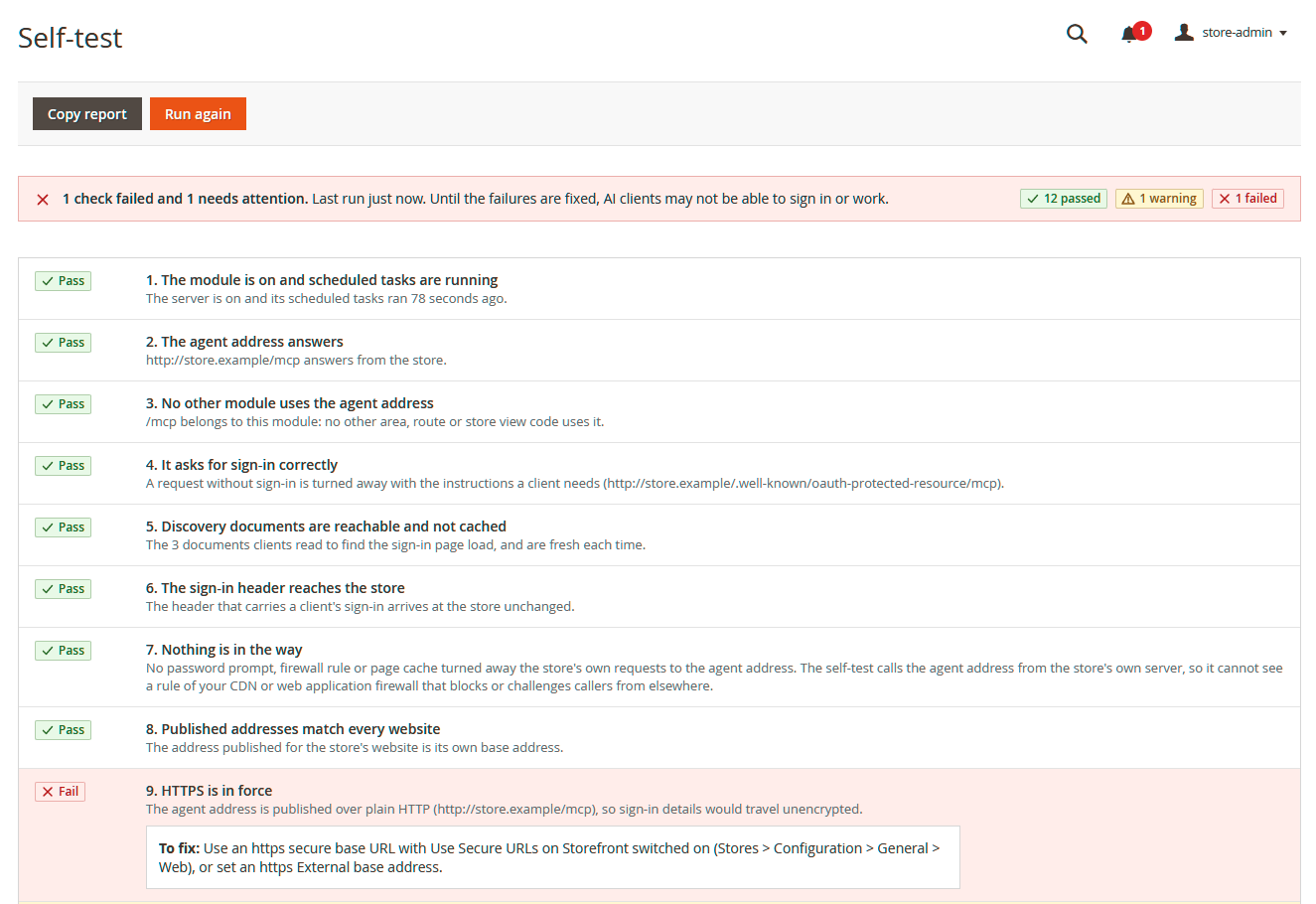 (opens a larger view)
The self-test checks the install from the store's side and says what to fix. Step 2: Give admin roles their AI access
One button creates three recommended roles: Read-only analyst, Catalog editor and Operations. Or tick tools on your own roles, like any other admin permission. Each role sets its write mode, its guardrails, which websites its agents may touch and whether customers' personal data stays masked.
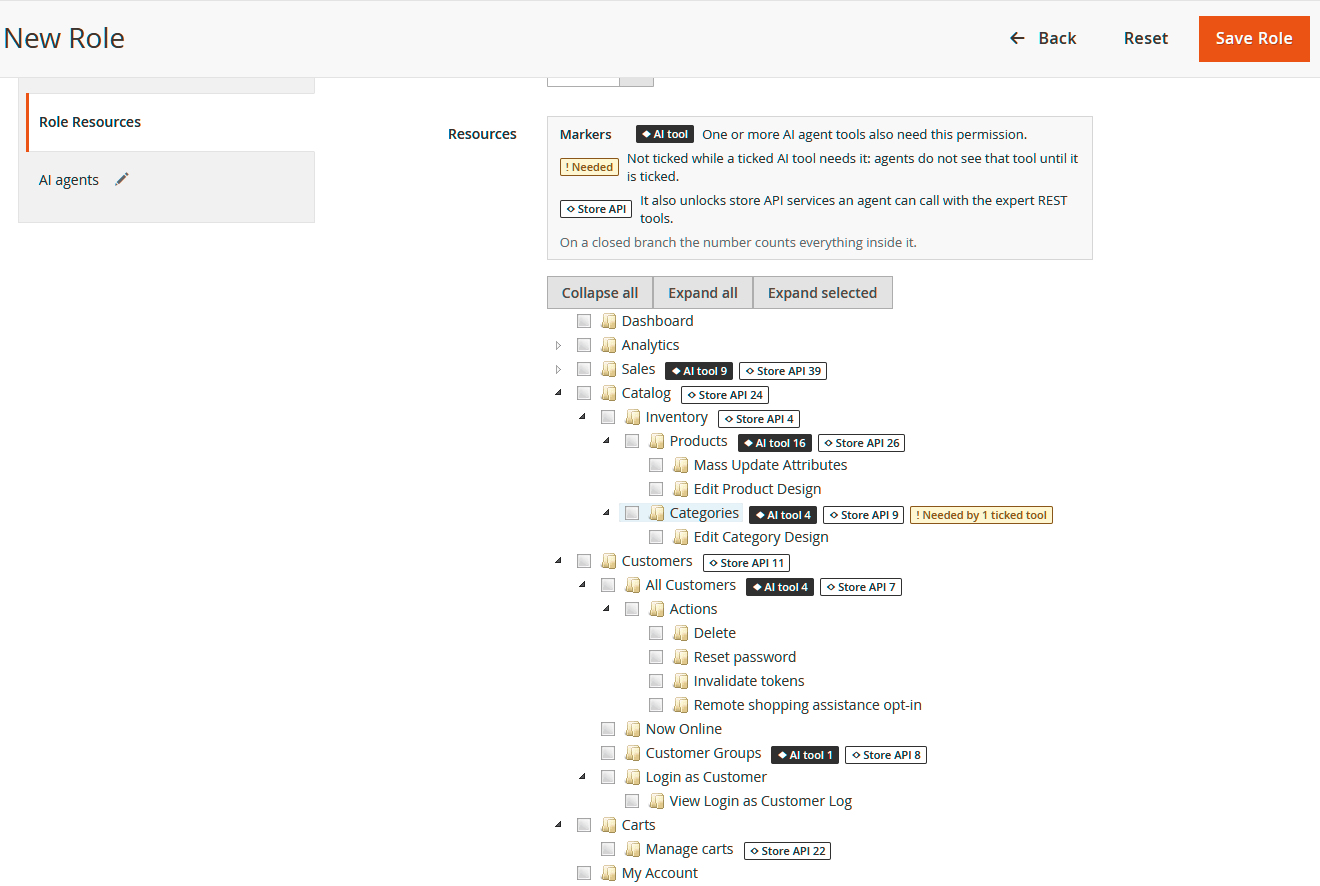 (opens a larger view)
Each role's resource tree shows which AI tools a permission unlocks. Step 3: Connect your AI app
Add your store's agent address to your AI app. The app sends you to your own admin, where an admin approves it on a consent screen that lists what it will be able to read and change. A team that shares one AI account can use one access token per agent profile instead.
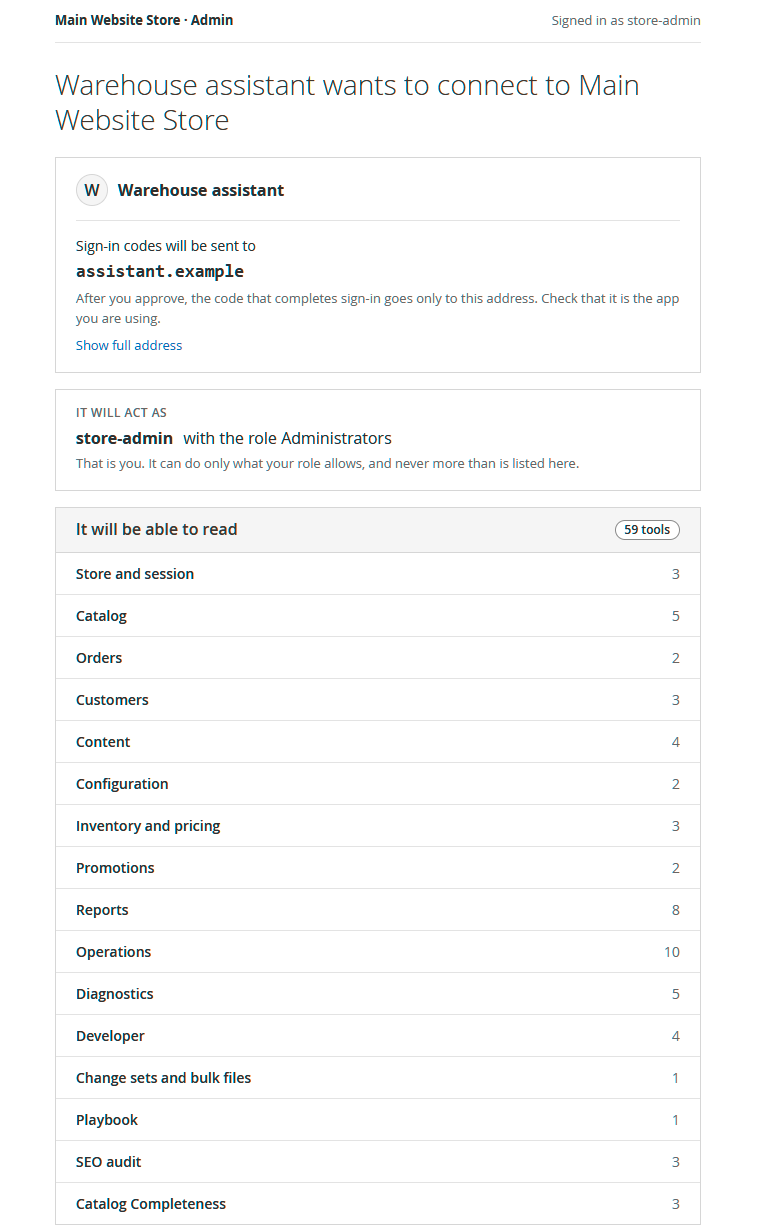 (opens a larger view)
Before an app connects, an admin sees where its sign-in code goes, who it will act as and what it can read. Step 4: Ask, then review in the Change History
Ask in your AI app as you would ask a colleague. Every change is recorded in the Change History before it runs, with who asked, the values before and after, and a way back. Bigger jobs arrive as one change set you review once.
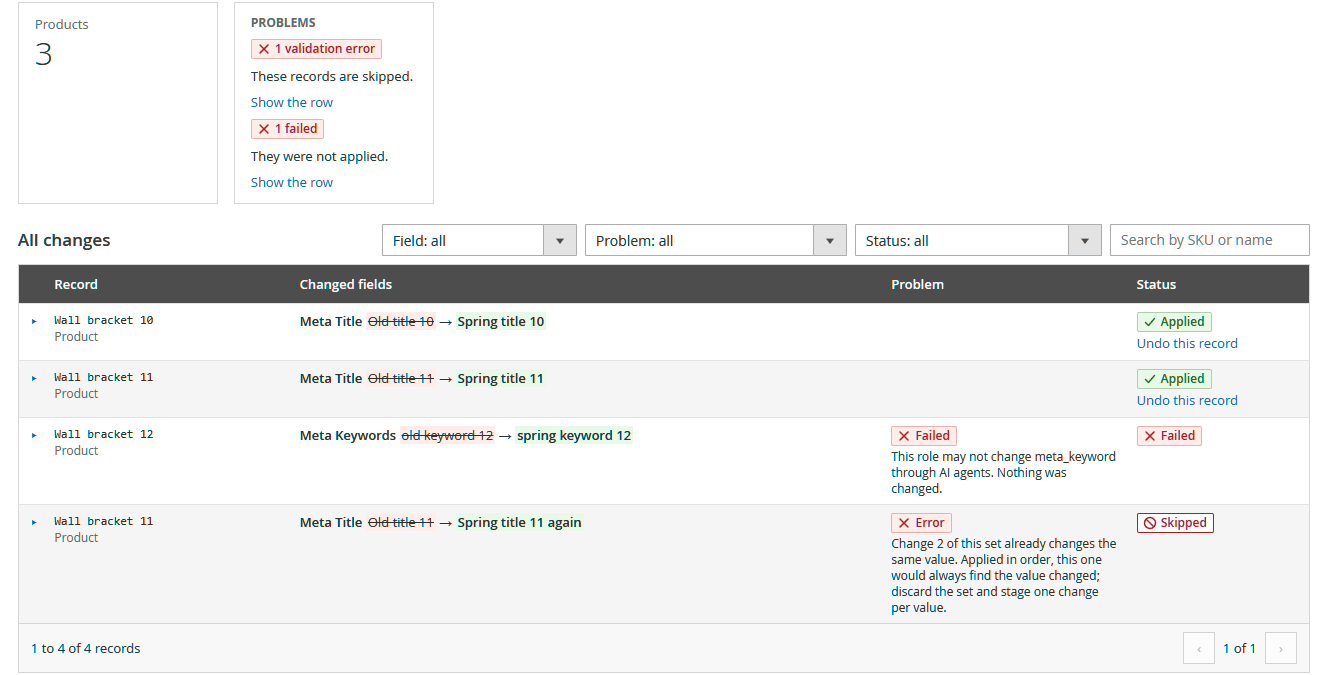 (opens a larger view)
A change set lists every record it touched, and each applied record can be undone on its own.
What AI Agents can do in your Magento admin
94 typed tools in 15 groups, 3 more when Catalog Completeness is installed, and 8 expert tools that start switched off. A role decides which of them its agents get.
- 94 typed tools
- 15 tool groups
- 3 more when Catalog Completeness is installed
- 8 expert tools that start switched off
| Group | Example tasks | Access |
|---|---|---|
| Reads the store | ||
| Store and session | Read the store's structure and main settings; tell the agent exactly what its role allows; search the guide agents read | Read |
| Reports | Sales by period, bestsellers, low stock, late orders, refunds, abandoned carts, search terms and products that stopped selling, computed from your own orders | Read |
| Diagnostics | Store health, recurring errors, data problems that break pages, upgrade readiness and admin security findings | Read |
| Developer | Which plugins, preferences, observers, routes and modules shape a class or a URL. Names only, never code | Read |
| SEO audit | Missing or weak meta titles and descriptions, thin or duplicate content, images without alt text and internal links to missing or disabled pages | Read |
| Catalog Completeness | The catalog's scores, one product's missing fields and the lowest-scoring products first With Catalog Completeness installed | Read |
| Reads and changes the store | ||
| Catalog | Find and read products and categories; update attributes on up to 100 products at once; create products, disabled unless you say otherwise; manage custom options, images, related products and category positions; add attribute options | Read and write |
| Orders | Search and read orders; comment, hold, invoice and ship; cancel and refund, which wait for a person from install | Read and write |
| Customers | Search and read accounts, personal data masked from install; change a group, name, address or newsletter flag; send a password reset email. Never an email address or a password | Read and write |
| Content | Find, read and edit CMS pages and blocks, with the change shown word by word | Read and write |
| Configuration | Find settings and where each value comes from; change only the settings you let agents change. Secret values stay masked | Read and write |
| Inventory and pricing | Read and set stock, per source where you run multi-source inventory; read and set base, special, tier and group prices inside your price guardrails; list catalog price rules | Read and write |
| Promotions | Read and create cart price rules, inactive until you say otherwise; generate coupon codes | Read and write |
| Operations | Caches, indexers, cron and queues; logs; URL rewrites and redirects; media uploads and folders; installed packages; the agent's own change history, undo and approval requests | Read and write |
| Change sets and bulk files | Stage many changes as one batch for one decision; upload a CSV of product changes and check it row by row | Read and write |
| Playbook | Read your store's notes for agents; propose a new note or prompt for a person to accept | Read and write |
| Expert tools | Your store's own REST API, GraphQL, and read-only SQL through a separate read-only database user Each off until you switch it on; every change waits for a person | Read and write |
Things people ask it
- Which products have no meta description? Write one for the first twenty and give me the batch to review before anything changes.
- Which orders have been waiting more than two days, and what is holding each one up?
- Put these five SKUs on special at 15% off for the next two weeks.
- What did shoppers search for last month and not find?
- Is cron running, and is anything stuck in the queue?
Each request runs as one of your admin users, within that user's role. A bigger job arrives in the Change History as one change set you review once, and each applied record can be undone on its own.
Three things to know before you connect an app
Preview is not a lock. In Preview, the agent shows you the change and confirms it inside your AI app. The store can't see whether the agent showed it to you, and an app that isn't on your side can confirm its own preview. When a person must see every change in your admin, use Approval.
A hosted app has to reach your store. Claude in the browser and ChatGPT call your store from their own servers on the internet. Your store needs a public HTTPS address, and a CDN or firewall in front of it must let those calls through to
/mcpand/.well-known/. The self-test calls from your own server, so it can pass while a firewall still blocks the app. The manual gives the rule your CDN needs.A shared connector is one admin user. A team that shares one Claude account connects through one access token per agent profile, and everyone who uses that connector acts as its admin user. The Change History names the profile, not the person who asked. Give each profile its own narrow role, and leave "Let an admin approve a change they asked for" off.
AI Agents write modes: read-only, approval, preview, direct
You choose how an agent's changes reach your store: one store-wide write mode, and one per role. The stricter of the two always applies, and the store-wide mode starts at Preview.
The four write modes, strictest first: Read-only, Approval, Preview and Direct. The store-wide mode starts at Preview.
Read-only
Agents can look, but cannot change anything. Change tools are not even listed to the app.
Approval
Every change waits until a person approves it under AI Agents > Approvals. The admin who asked can't approve it unless you allow that.
Preview
The agent must confirm a before-and-after preview before a change applies. The preview shows in your AI app, so it guards against mistakes, not against an app you don't trust.
Direct
Changes apply at once and are recorded in the Change History.
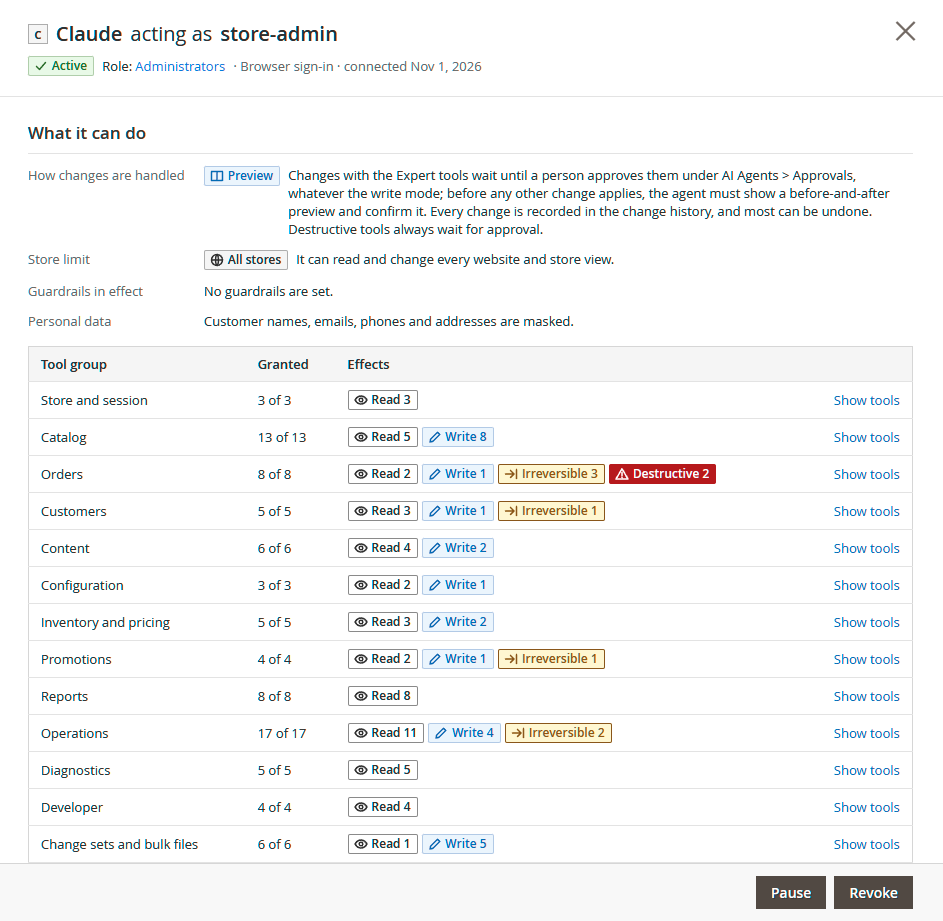
Change History, with undo
Every change an agent makes or asks for is recorded before it runs: who asked, through which app, with which tool, the values before and after, and the result. Undo puts the earlier values back, for 30 days by default, and never overwrites a newer edit: it shows the conflict instead. Undo never deletes a product, page, block or cart price rule an agent created: a product is disabled and hidden, a page or block disabled, a cart price rule made inactive. A change set that is still being applied can't be undone until it finishes or is stopped. Invoices, shipments, refunds, cancellations, emails and coupon codes can't be undone, and each is marked that way before it runs.
Where your data goes
Your AI app talks to your store directly. Nothing passes through our servers: AI Agents has no license check, no update check and no usage reporting. What an agent reads goes to the AI app that asked for it, under that app's terms.
Cancels and refunds wait
Cancelling and refunding an order wait for a person in every write mode, from install. So does every change through the expert tools.
Guardrails
Limit which product attributes may change, how far a price may move, how large a refund may be, how many records one change may touch and which settings agents may change.
Pause
One button stops every agent at once, and nothing is revoked. The server also pauses a connection by itself when its changes, errors or guardrail hits pass a threshold.
Limits and alerts
Calls a minute, changes an hour and rows read an hour, per connection. Alert emails when a new app connects, a change waits for approval or a connection is paused.
Personal data masked
Customers' names, emails, phones and addresses reach agents masked from install. Passwords, card data, keys and secret settings never leave the server.
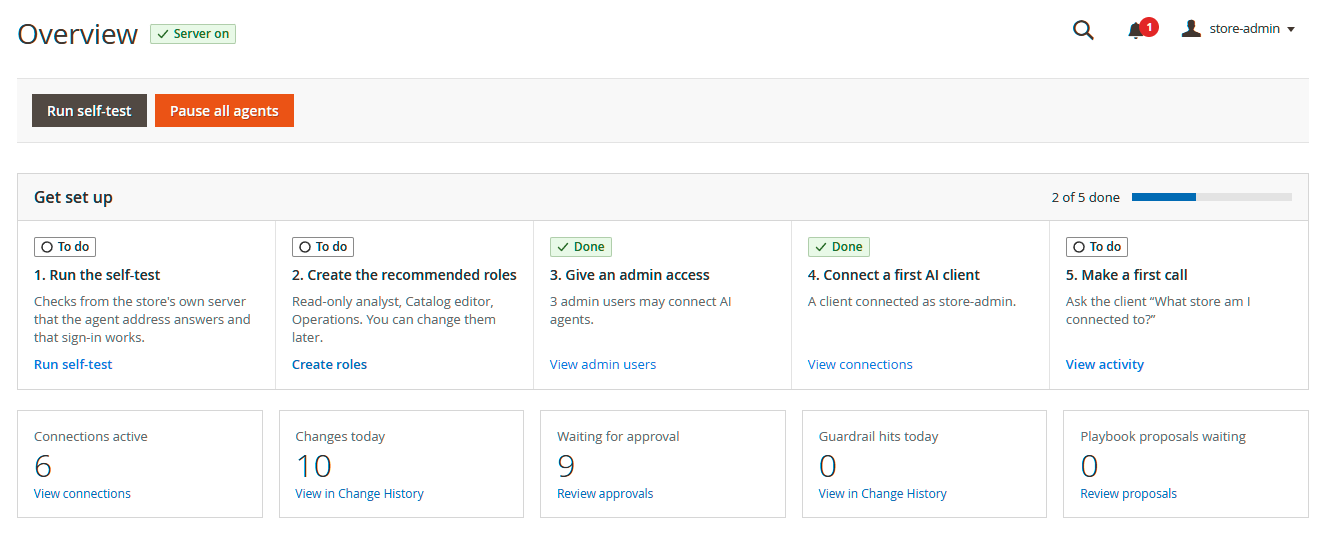
Self-test
Checks the install from the store's own server, sign-in included, and says what to fix.
A tour of AI Agents
Transcript
AI in your Magento admin? Only if it comes with an undo.
Claude connects with one access token, as one admin user. That user's role is read-only, so it only reads.
Ask which products haven't sold in 90 days. It answers from live store data, and every call is logged.
When you're ready, switch its role to Approval. Now it can propose changes, and every one waits for a person.
Ask for 10 percent off those 12. It stages one change set, and nothing applies until you approve it.
Check every line, then approve it yourself. One approval, one change record, one undo.
Changed your mind? Undo the whole set and confirm. All 12 records are undone, and the undo is recorded too.
The fine print. Every change is recorded before it runs, and one button pauses every agent.
AI Agents is a one-time purchase per store. You get a year of updates and a 30-day refund.
Your move. Put an agent to work at bigcartenergy.com.
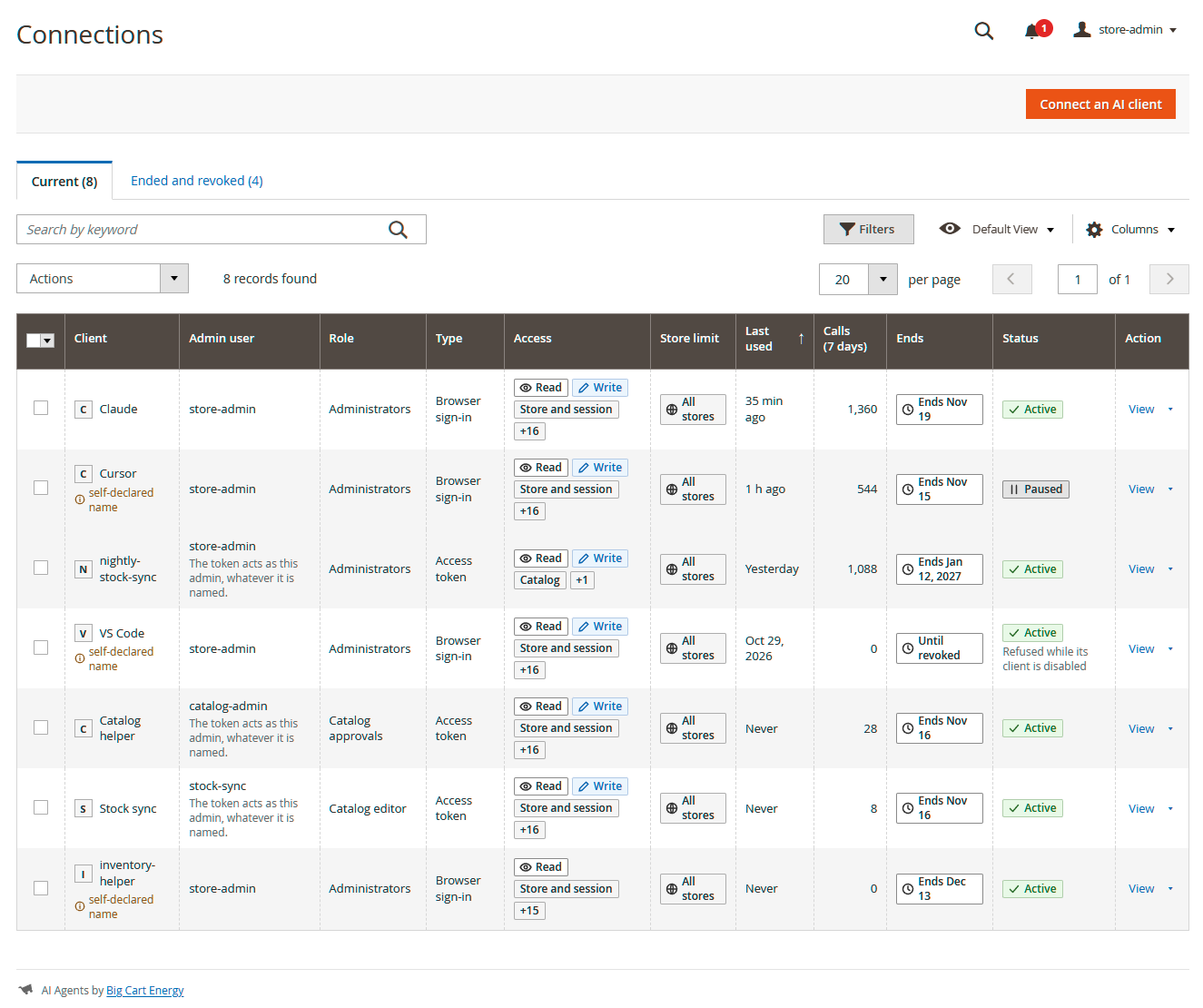 (opens a larger view)
Every AI app connected to the store, the admin user it acts as and what it may do. - (opens a larger view)
Each connection shows what it can do before it does anything. - (opens a larger view)
Before an app connects, an admin sees where its sign-in code goes, who it will act as and what it can read.
Show all 9 screensShow fewer
- (opens a larger view)
A change set lists every record it touched, and each applied record can be undone on its own. 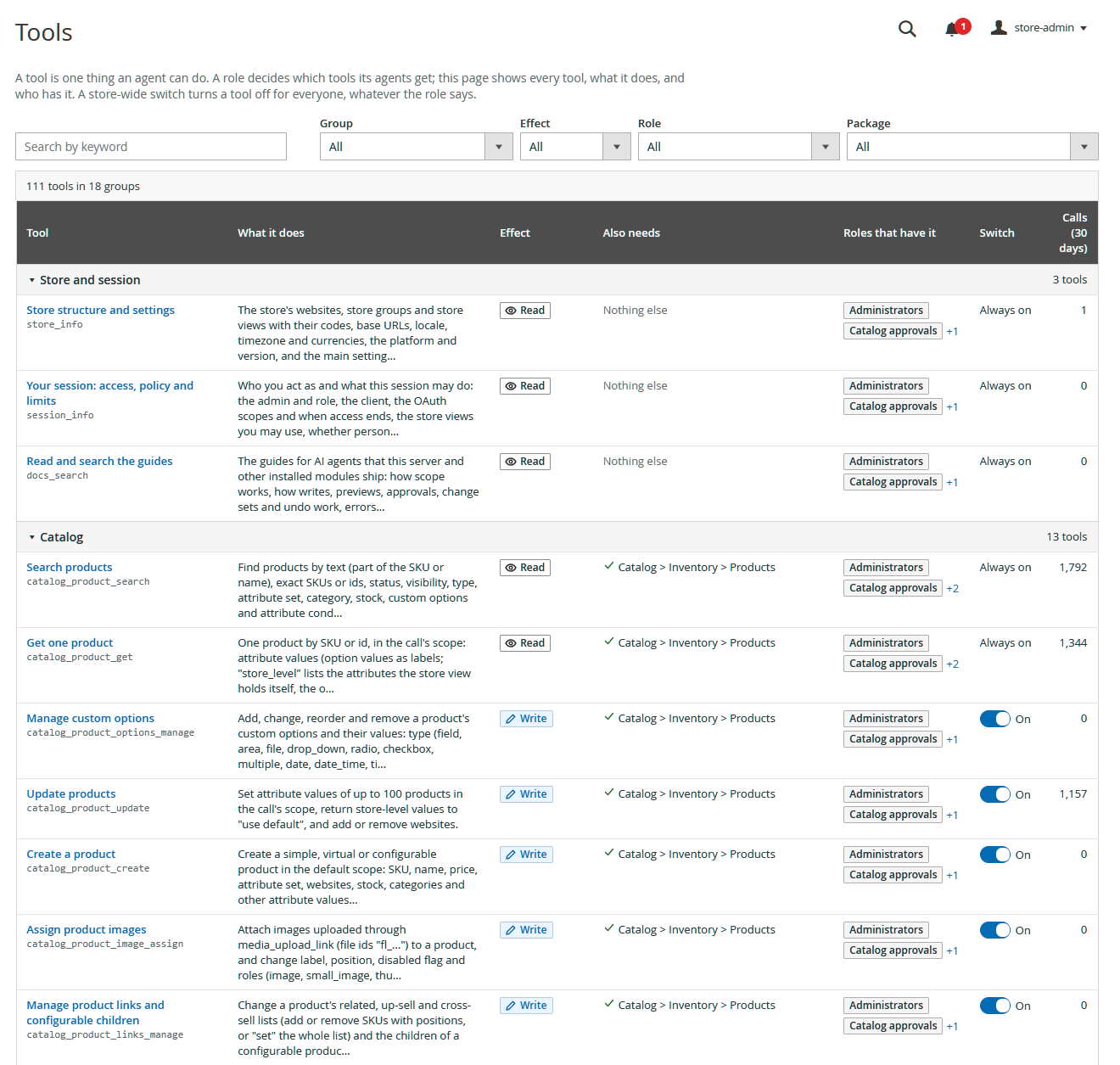 (opens a larger view)
Every tool an agent can use, its effect and the roles that have it. 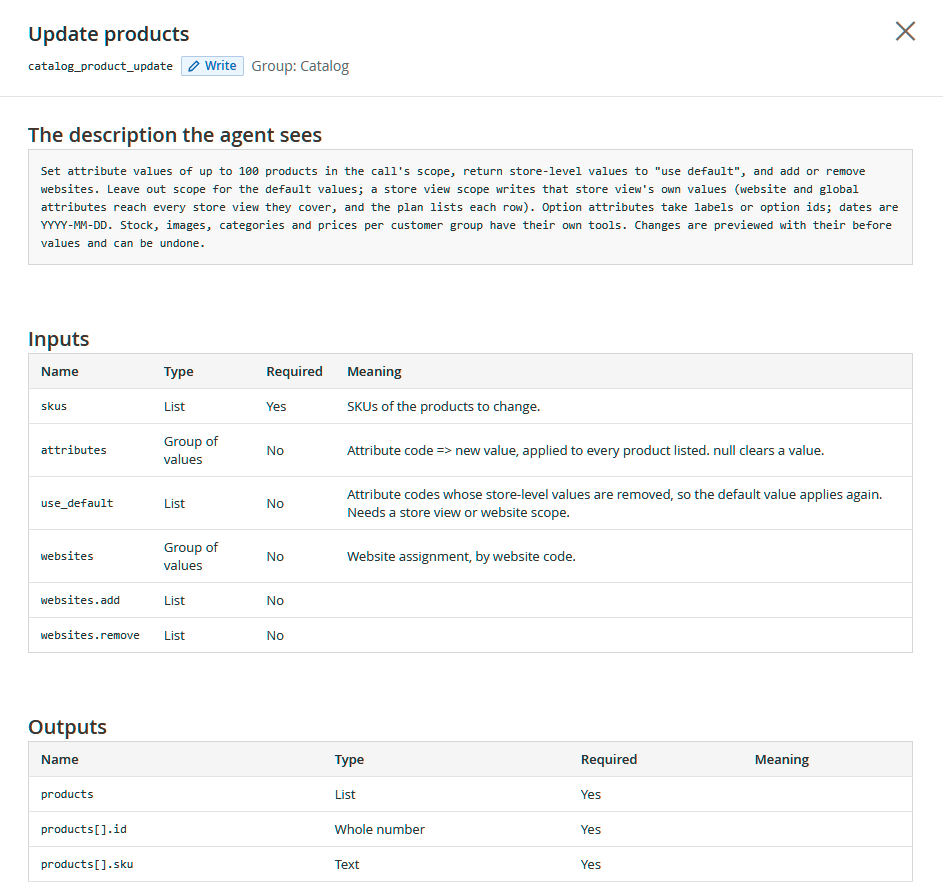 (opens a larger view)
Each tool shows the exact description the agent reads before it acts. - (opens a larger view)
Each role's resource tree shows which AI tools a permission unlocks. 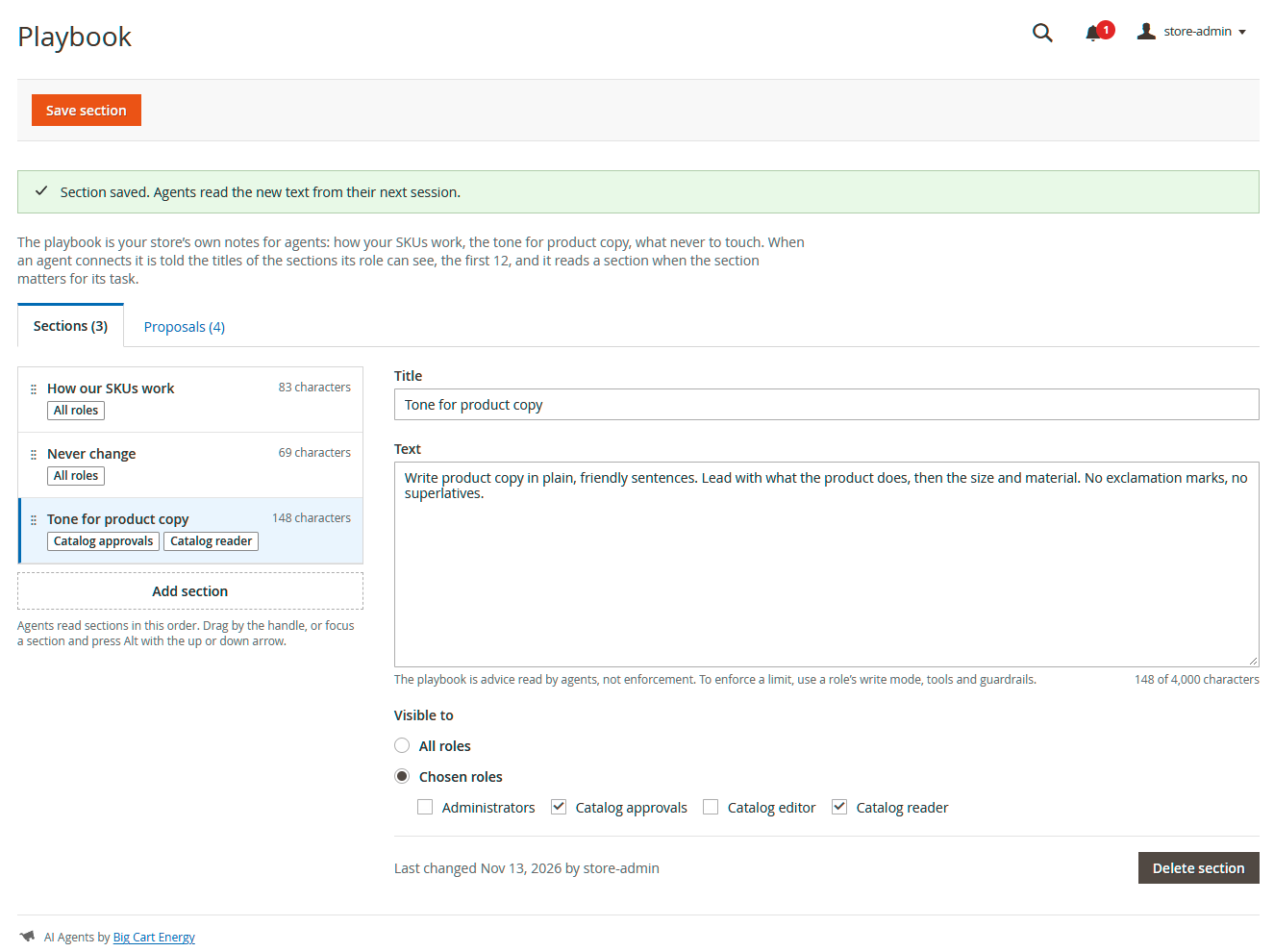 (opens a larger view)
The playbook holds your store's own notes for agents, role by role. - (opens a larger view)
The self-test checks the install from the store's side and says what to fix.
AI Agents compatibility: tested Magento and PHP versions
Tested versions · As of Nov 14, 2026
Tested versions
- Magento Open Source
- 2.4.9
- 2.4.8
- 2.4.6
- 2.4.5
- 2.4.0
- 2.3.7-p4
- 2.3.5-p2
- 2.3.0
- Mage-OS
- 4.0.0
- PHP
- 7.1
- 7.2
- 7.3
- 7.4
- 8.1
- 8.3
- 8.4
- 8.5
- Databases
- MariaDB 10.3.39
- MariaDB 10.6.28
- MariaDB 12.3.3
- MySQL 5.7.44
- MySQL 8.0.28
- MySQL 8.0.46
- MySQL 8.4.13
All 13 bench runs, with PHP, database and day
| Edition | Version | PHP | Database | Result | Bench day |
|---|---|---|---|---|---|
| Magento Open Source | 2.4.9 | 8.5 | MariaDB 12.3.3 | Passed | |
| Magento Open Source | 2.4.9 | 8.5 | MySQL 8.4.13 | Passed | |
| Magento Open Source | 2.4.8 | 8.3 | MySQL 8.4.13 | Passed | |
| Magento Open Source | 2.4.6 | 8.1 | MariaDB 10.6.28 | Passed | |
| Magento Open Source | 2.4.6 | 8.1 | MySQL 8.0.46 | Passed | |
| Magento Open Source | 2.4.5 | 8.1 | MySQL 8.0.28 | Passed | |
| Magento Open Source | 2.4.0 | 7.4 | MySQL 8.0.28 | Passed | |
| Magento Open Source | 2.3.7-p4 | 7.4 | MySQL 5.7.44 | Passed | |
| Magento Open Source | 2.3.5-p2 | 7.3 | MariaDB 10.3.39 | Passed | |
| Magento Open Source | 2.3.5-p2 | 7.3 | MySQL 5.7.44 | Passed | |
| Magento Open Source | 2.3.0 | 7.2 | MySQL 5.7.44 | Passed | |
| Magento Open Source | 2.3.0 | 7.1 | MySQL 5.7.44 | Passed | |
| Mage-OS | 4.0.0 | 8.4 | MySQL 8.4.13 | Passed |
Composer accepts a wider range; we list only what we ran.
Composer accepts Magento Open Source 2.3 and 2.4 and Mage-OS on PHP 7.1 to 7.4 or 8.1 to 8.5. That is what installs; tested means a row in the table above.
Adobe Commerce: not tested. Features only Adobe Commerce has, such as content staging, B2B company accounts and shared catalogs, are not covered.
AI apps
- VerifiedClaude (web and desktop apps). Through a connector in Claude's settings.
- ExpectedClaude Code, ChatGPT, Cursor, VS Code, Gemini CLI, Codex. Copy-and-paste setup for each one in the admin's connect panel and the manual.
- ExpectedOther apps that support remote MCP servers. With browser sign-in, or an access token in a request header.
- Not supportedApps that connect only over SSE. The server speaks Streamable HTTP only.
Your store needs
- HTTPS. An app that runs on the internet, such as Claude in the browser or ChatGPT, needs your store at a public HTTPS address
- Magento cron running every cron group, including bce_mcp and bce_mcp_changesets
- A web server, CDN and firewall that pass the Authorization header and don't block, challenge or cache /mcp and /.well-known/
- MySQL or MariaDB in a version your Magento release supports. The optional SQL tool needs MySQL 5.7.8 or MariaDB 10.1 or later
- An AI app that supports remote MCP servers, on your own subscription
AI Agents pricing and license
| Item | Price | Black Friday price | Renewal, optional |
|---|---|---|---|
| AI Agents This page | $139€135£109 | $119 through Dec 1, 2026 (Pacific time) or the 25th order at this price€115 through Dec 1, 2026 (Pacific time) or the 25th order at this price£95 through Dec 1, 2026 (Pacific time) or the 25th order at this price | $85 a year€79 a year£69 a year |
| Product-options add-on Needs AI Agents and Mageworx Advanced Product Options. | $99€95£79 | Not in the sale | $39 a year€37 a year£32 a year |
| Catalog Completeness | $99€95£79 | Not in the sale | $39 a year€37 a year£32 a year |
Prices per live store, one-time. Excludes VAT and sales tax. PayPal charges in the currency shown; at the card checkout, the currency follows your location.
Bundles
BundleBlack Friday price
AI Agents and Catalog Completeness
$179€169£145
Bought separately today: $218Bought separately today: €210Bought separately today: £174
BundleBlack Friday price
All three
AI Agents + Product-options add-on + Catalog Completeness
$259€245£211
Bought separately today: $317Bought separately today: €305Bought separately today: £253
The license, in four sentences
- One license covers one live store, plus that store's own staging, test and development copies.
- You may change the code for that store, and let your developers or agency work on it, but you may not share, sell or publish it.
- Every version we release in the year after you buy is yours to keep.
- Renew only if you want newer versions: the ones you have keep working either way.
Refunds: 30 days from the day you buy, no questions asked. A refund ends the license.
Included
- The server: sign-in through your own admin, AI access per role, four write modes, guardrails, limits, the Change History with undo, approvals, pause, alerts and the self-test
- 94 typed tools in 15 groups, and 3 more that appear with Catalog Completeness
- 8 expert tools: your store's REST API, GraphQL and read-only SQL, each off until you switch it on
- 11 admin screens under Big Cart Energy > AI Agents, and an AI agents tab on every role and admin user
- Ten ready-made prompts, a playbook for your store's own rules, and a guide agents read
- The user manual, online and as a PDF
- Every version released in your update year, from your account or our private Composer repository
- Bug and security reports by email
Not included
- The AI app and its subscription, under its maker's terms
- Installation and setup: a separate service we offer
- The product-options add-on, sold separately
- A license for a second live store
- Features only Adobe Commerce has, such as content staging and B2B company accounts
- A response-time guarantee, custom development or hosting
How delivery works
Pay by card or with PayPal. We email you as soon as your license is ready.
Sign in to your account with that address, through Google, GitHub or a code we email you. Every version your license covers is there.
Make a Composer key pair and install from our private repository, as below, or download the zip files. The manual has every step.
composer config repositories.bigcartenergy composer https://bigcartenergy.com/composer/
# Composer asks for a user name and a password for bigcartenergy.com: give the public key as the user name and the private key as the password.
# Typed at the prompt, the private key stays off the command line and out of your shell history, and Composer hides the password as you type it.
# Never commit auth.json or the key pair to any repository, private ones included.
# On a build or deploy server, give Composer the pair through the COMPOSER_AUTH environment variable.
composer require bigcartenergy/module-mcp bigcartenergy/module-mcp-expert
bin/magento module:enable BigCartEnergy_Core BigCartEnergy_Mcp BigCartEnergy_McpExpert
bin/magento setup:upgrade && bin/magento setup:di:compile && bin/magento cache:clean
In production mode, also run bin/magento setup:static-content:deploy with every locale your admin users use. Keep auth.json out of your code repository.
Your files and Composer keys are always in your account.
Who sells it
Card purchases are sold by Link, Stripe's merchant-of-record service, which adds the tax for your country and emails your receipt and invoice. The files and your license come from us.
PayPal purchases are sold by Big Cart Energy, with our own numbered invoice and no tax added. In the EU, Monaco, the UK and the Isle of Man, add your VAT number in the PayPal box and, once it's confirmed, the invoice carries the reverse charge. Leave it empty and the box opens the card checkout, where Link adds the VAT.
Want it set up by the people who built it?
We install it on your staging copy, then live, set up roles, write modes and guardrails for how your team works, connect your AI app and get every self-test line passing. Scoped in writing, like all our work.
The AI Agents manual
Install
Composer, the modules, cron and the first checks.
Connecting an AI app
Claude and the other apps step by step, and what to do when the first connection fails.
Roles
The three recommended roles, and three safe ones built click by click.
Write modes
Read-only, Approval, Preview and Direct, with the same request in each.
Change History and undo
What is recorded, how undo works and what can't be undone.
Security guide
What each tool group can expose, and what you must do yourself.
AI Agents changelog
1.0.0- First release: the AI agent server inside Magento, with sign-in through your own admin, AI access per role, the four write modes, guardrails, limits, pause, alerts and the Change History with undo.
- 94 typed tools in 15 groups, 3 more with Catalog Completeness, and the 8 expert tools as their own package.
- Ten ready-made prompts, the playbook and the guide agents read.
SHA-256 of each file
- module-mcp-1.0.0.zip
- 0412a8613032c623e1e1f68a3cad7dbb54c47d1abefc56df1e4d0a4faca20cc8
- module-mcp-expert-1.0.0.zip
- afaec5f3882b12f3d59ee21dd967b9f91071b84fa803e8c7e40572d5aa6a38cb
Questions about AI Agents
Product
What is a Magento MCP server?
MCP, the Model Context Protocol, is the open standard AI apps such as Claude use to call tools outside themselves. A Magento MCP server offers a store's admin as those tools. AI Agents runs that server inside your store: the app signs in through your own admin as one of your admin users, and every tool does one job, within that user's role.
Which AI apps work with it?
AI Agents works with Claude, Claude Code, ChatGPT, Cursor, VS Code, Gemini CLI and Codex, and with any other app that supports remote MCP servers over Streamable HTTP. The connect panel in your admin gives copy-and-paste setup for each one. The AI app is your own subscription, under its maker's terms.
Can the AI change anything without asking?
Only what you allow. An agent acts as one of your admin users and can use only the tools that user's role grants. In Read-only it changes nothing; in Approval every change waits for a person; in Preview the agent must confirm a before-and-after preview first; only in Direct do changes apply at once. The store-wide mode starts at Preview. Cancelling and refunding orders wait for a person in every mode from install, and so does every change through the expert tools.
Can I undo what it did?
Most of it. Every change is recorded in the Change History before it runs, and undo puts the earlier values back, for 30 days by default. Undo never overwrites a newer edit, and it never deletes a product, page, block or cart price rule an agent created: a new product is disabled and hidden, a new page or block disabled, a new cart price rule made inactive. Invoices, shipments, refunds, cancellations, emails and coupon codes can't be undone, and they're marked that way before they run.
Does any store data pass through your servers?
No. Your AI app talks to your store directly, and AI Agents has no license check, no update check and no usage reporting. What an agent reads goes to the AI app that asked for it, under that app's terms. Apart from that, the store sends only its alert emails, the sign-in code to the app you approved, and two fetches that stay off until you switch them on.
Does it work on Adobe Commerce or Mage-OS?
Mage-OS, yes: Composer installs it on Mage-OS exactly as on Magento Open Source. Mage-OS version we ran: 4.0.0, on PHP 8.4 with MySQL 8.4.13. Adobe Commerce has not been tested, and features that exist only in Adobe Commerce, such as content staging and B2B company accounts, are not covered.
Which Magento, PHP and database versions are tested?
Tested for this release: Magento Open Source 2.3.0 (PHP 7.1 and 7.2, MySQL 5.7.44), 2.3.5-p2 (PHP 7.3, MySQL 5.7.44 and MariaDB 10.3.39), 2.3.7-p4 (PHP 7.4, MySQL 5.7.44), 2.4.0 (PHP 7.4, MySQL 8.0.28), 2.4.5 (PHP 8.1, MySQL 8.0.28), 2.4.6 (PHP 8.1, MySQL 8.0.46 and MariaDB 10.6.28), 2.4.8 (PHP 8.3, MySQL 8.4.13) and 2.4.9 (PHP 8.5, MySQL 8.4.13 and MariaDB 12.3.3), and Mage-OS 4.0.0 (PHP 8.4, MySQL 8.4.13). We list a version as tested only after it passes our bench. Composer accepts more, Magento Open Source 2.3 and 2.4 and Mage-OS on PHP 7.1 to 7.4 or 8.1 to 8.5 with MySQL or MariaDB, but anything not in the table is untested. Install on a staging copy first either way.
Why pay when free Magento MCP servers exist?
Because calling the admin is the easy part. Controlling it is the product. AI Agents decides per role what an agent may touch and how each change lands: read-only, approval by a person, a confirmed preview, or direct. It records every change before it runs and undoes most of them, pauses every agent with one button, masks customers' personal data from install, and holds guardrails on prices, refunds and settings. You also get the manual, a year of updates, support by email and a no-questions refund if it isn't right for your store.
Do I need the expert tools or the product-options add-on?
Neither. The 8 expert tools come with AI Agents and start switched off: calls to your store's REST API, GraphQL and read-only SQL, for developers who would otherwise do the same work on the server. The product-options add-on is sold separately, and only for stores that run the Mageworx Advanced Product Options extension.
Can my team share one AI account?
Yes. Make one admin user per agent profile, such as an analyst and a catalog editor, each with its own role, and one shared connector per profile in your team's Claude account, carrying that admin user's access token. Everyone who uses a connector acts as its admin user, so the Change History names the profile, not the person who asked. Who may use which connector is decided in your Claude account.
Does it slow my store down?
Storefront pages don't change: the module only adds a small router that answers its own addresses. Agent requests run like admin work, within the limits you set, and heavy calls such as long reports run one at a time per connection.
Buying
What does one license cover?
One license covers one live store, plus that store's own staging, test and development copies. You may change the code for that store, and let your developers or agency work on it, but you may not share, sell or publish it. A second live store needs its own license, and that holds for agencies too: a license bought for one client's store doesn't cover another's.
Can I use one license on staging?
Yes. One license covers one live store and that store's own staging, test and development copies, as long as they don't serve customers. Install and test every update on staging before your live store.
What happens after the year of updates?
The versions you have keep working, for good. Newer versions need a renewal, which is optional: $85 · €79 · £69 a year. A renewal adds 12 months from your end date, or from the day you renew if that's later, and opens every version released in between.
Can I get a refund?
Yes. Within 30 days of buying, for any reason. A refund ends the license.
How does the refund work?
Reply to your order email or write to hello@bigcartenergy.com within 30 days of the purchase day. A call to (888) 860-8299 can start it too: we confirm by email from the address on your order before we refund. We refund the full amount the way you paid: a card purchase through Link, a PayPal purchase through PayPal, with a credit note against our invoice. The refund ends the license, so its downloads and Composer keys stop working at once, and a bundle's refund ends every license in it.
How do I get the files and install them?
After you pay, we email you. Sign in to your account with that address: every version your license covers is there. Make a Composer key pair and install from our private repository with composer require, or download the zip files and install them from a folder in your project. The manual has every step.
How do Composer keys work?
A key pair is a username and password for our private Composer repository: the public key and the private key. You make one in your account; it opens one license per item, for one store. We show the private key once and keep only a fingerprint of it. Composer then installs every version that license covers, and after the update year it keeps installing those versions but no newer ones. Regenerate gives a pair a new private key; Revoke cuts it off at once. Keep auth.json, where Composer stores the pair, out of your code repository.
Why is there no password?
Because a password is one more thing to leak. You sign in with Google, with GitHub, or with a link and a code we email you each time. Changes that matter, such as a new key pair or another address on the account, ask you to confirm it's you with a fresh code first, and every address on the account hears about each one.
Can I pay with PayPal?
Yes. PayPal purchases are sold by Big Cart Energy: you approve the payment on paypal.com, in the currency shown, with no tax added, and we email our own numbered invoice. In the EU, Monaco, the UK and the Isle of Man, the PayPal box has an optional field for your VAT number. With a number we can confirm, the invoice carries the reverse charge. Without one, the box opens the card checkout, where Link, Stripe's merchant-of-record service, adds the VAT. Renewals are paid by card.
Can I get a VAT invoice?
Yes. Pay by card and Link, Stripe's merchant-of-record service, emails your receipt and invoice with the tax it charged. Pay with PayPal and we email our own numbered invoice, which is also in your account under Purchases. It adds no tax, and with a VAT number we've confirmed it shows the number and the reverse charge.
Will you install it for us?
Yes. Installation and setup is a separate service, scoped in writing like all our work: we install on your staging copy first, then live, and set it up for how your team works. Tell us about your store in the form on this page.