License: Open Software License 3.0 (OSL-3.0)
Use it at your own risk. Install it on a staging copy of your store first.
The screens in this manual come from our demo store: an invented catalog of fasteners, tools and safety gear on Magento Open Source 2.4.8, with three placeholder brands.
1. What it does
Catalog Completeness is product information management inside Magento. It scores every product from 0 to 100 against the rules you set: what each attribute set needs, and what each sales channel needs, such as Google Merchant Center. A work list shows what is missing, lowest score first, so you know which products to fix next, and a second view lists the products no rule covers yet. You can export either list as CSV for whoever does the data entry, and read or refresh any product's scores over Magento's REST API. Magento's indexer and a scheduled rescore keep the scores current. What it doesn't do: it syndicates no feeds, connects to no channel and holds no product data outside Magento. Your product data stays where it is. The module reads it and writes its scores to its own tables. The module is free, with every feature in it, and if you'd rather not set it up yourself, we install and configure it for you (section 11).
2. Requirements and compatibility
- Magento Open Source. The lines we tested are in the table below. Adobe Commerce isn't supported in this version.
- Composer, with access to Packagist.
- Cron. Magento's cron runs the periodic rescore, starts the queue consumer that works recalculations, and applies changes in Update by Schedule mode. Without cron, recalculate from the command line (section 7).
bigcartenergy/module-core, which Composer installs with the module. Core holds the Big Cart Energy admin menu and configuration tab. It does nothing on its own.
Tested versions
| Magento Open Source | PHP | Database |
|---|---|---|
| 2.4.9 | 8.5 | MySQL 8.4 |
| 2.4.8 | 8.3 | MySQL 8.4 |
| 2.4.7 | 8.2 | MySQL 8.0 |
| 2.4.6 | 8.1 | MySQL 8.0 |
| 2.3.7-p4 | 7.4 | MySQL 5.7 |
Each line passed our test bench: installation, every admin screen, REST, both indexer modes, the recalculation queue, CSV export, mass actions, the periodic rescore from Magento cron, and a clean uninstall. A version that isn't in this table hasn't been tested. Whatever your version, test on staging before production.
3. Installation
Run these commands from the Magento root, as the user that owns the Magento files:
composer require bigcartenergy/module-catalog-completeness
bin/magento module:enable BigCartEnergy_Core BigCartEnergy_CatalogCompleteness --clear-static-content
bin/magento setup:upgrade
bin/magento setup:di:compile
bin/magento cache:clean
In production mode, also run bin/magento setup:static-content:deploy after the compile.
What the installation creates. Six database tables, all prefixed bce_completeness_; the indexer "Catalog completeness score"; a message queue topic and its consumer; the cron job bce_completeness_rescore, in its own cron group bce_completeness; and the admin screens. It creates no rule sets, no product attributes and no data. The default settings live in the module's code.
Check that it worked. Log in to the admin and open the Big Cart Energy menu. Its section PIM: Catalog Completeness lists Dashboard, Rule sets and Settings.
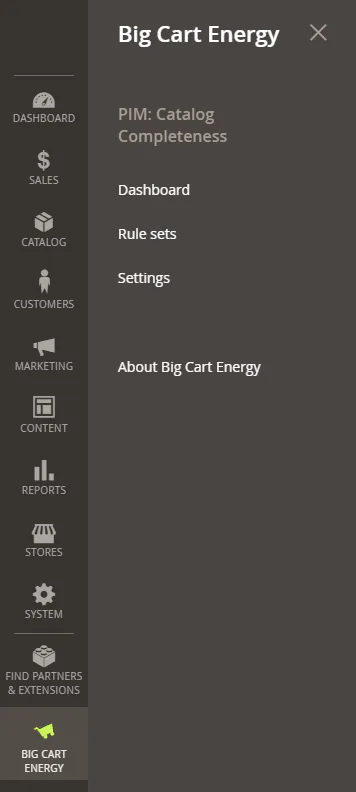
Then check which indexer mode the module started in (section 7.1 explains the two modes):
bin/magento indexer:show-mode bce_completeness_scoreIf your server's crontab names Magento's cron groups one by one, add the group bce_completeness to it (section 7.5).
Give your team access
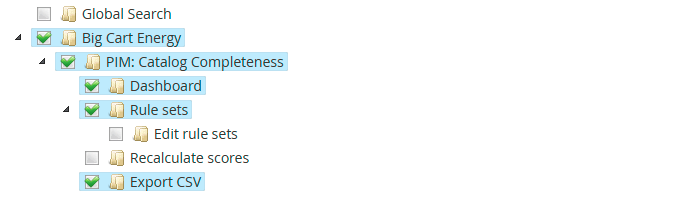
Go to System > Permissions > User Roles, open a role and choose Role Resources. With Resource Access set to Custom, the module's rights sit under Big Cart Energy > PIM: Catalog Completeness:
| Right | Allows |
|---|---|
| Dashboard | Opening the dashboard and reading scores, in the admin and over REST |
| Rule sets | Opening rule sets. Without the next right, they open read-only |
| Edit rule sets | Creating, changing, duplicating and deleting rule sets |
| Recalculate scores | Every recalculate button, and the recalculate REST route |
| Export CSV | Export CSV and Export selected |
The settings page has its own right, PIM: Catalog Completeness Section, under Stores > Settings > Configuration.
4. First-run setup
Open Big Cart Energy > PIM: Catalog Completeness > Dashboard. The page is titled Catalog Completeness. Until a rule set exists, it shows the three setup steps and a Create a rule set button.
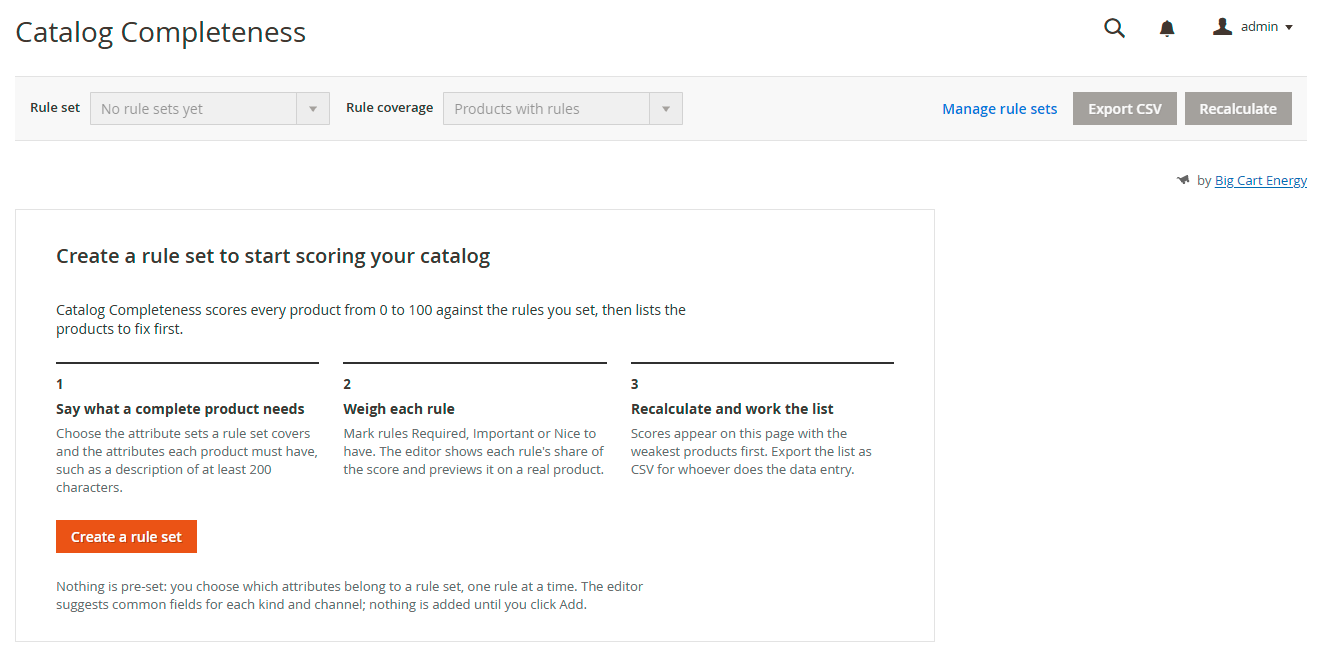
Nothing comes pre-set. You decide which attributes count, one rule at a time. The editor suggests the fields most catalogs and channels need, and adds nothing until you click Add.
4.1 Create a rule set for your attribute sets
An attribute set already decides which fields a product has, so it is the natural place to say what complete means.
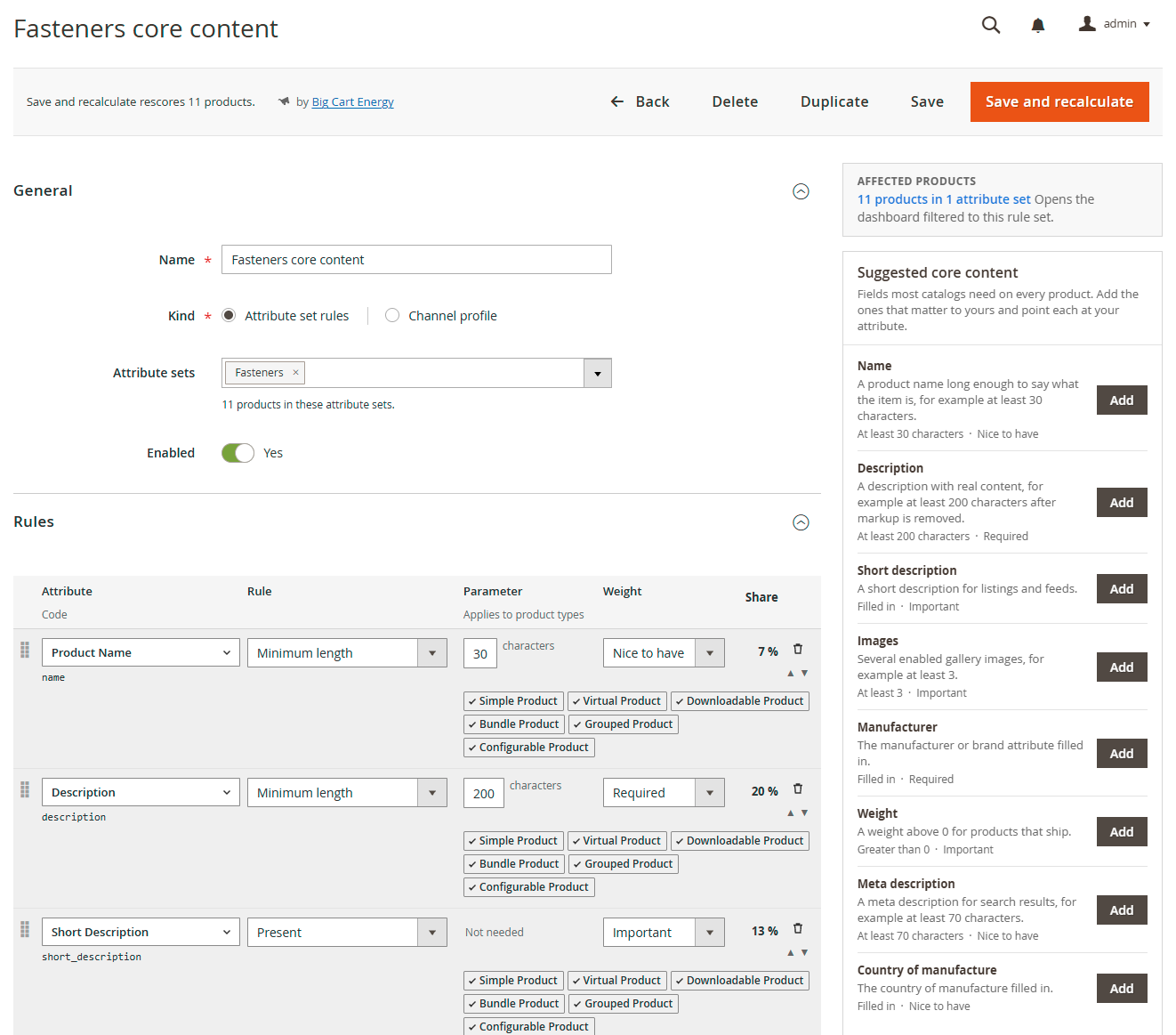
- Click Create a rule set on the dashboard, or go to Big Cart Energy > PIM: Catalog Completeness > Rule sets and click Create a rule set.
- Under General, fill in Name, for example "Fasteners core content".
- Set Kind to Attribute set rules.
- In Attribute sets, choose the attribute sets this rule set covers. The line under the field counts the products in them. Each attribute set can belong to one rule set of this kind, so each product gets one main score.
- Add a Description if it helps your team, and leave Enabled on Yes.
- Under Rules, click + Add rule for an empty row, or click Add next to a field in the Suggested core content list beside the form. A suggestion fills in the rule, its parameter and a weight, and leaves the attribute for you to choose. The list marks a suggestion Added once you click it, until you leave the page. It doesn't look at rules saved earlier, so check the table before you add a field twice.
- Fill in each row:
- Attribute: click the field and type part of a label or code to find the attribute. Section 5.4 explains what the picker tells you.
- Rule: one of six rule types (section 5.2).
- Parameter: the number, list or pattern the rule needs. Rules that take none show "Not needed".
- Weight: Required, Important or Nice to have (section 5.3).
- Applies to product types: the six chips under the row. All six are on by default. Click a chip to turn it off.
- Read the Share column as you go. The footer says how much of the score your Required rules carry.
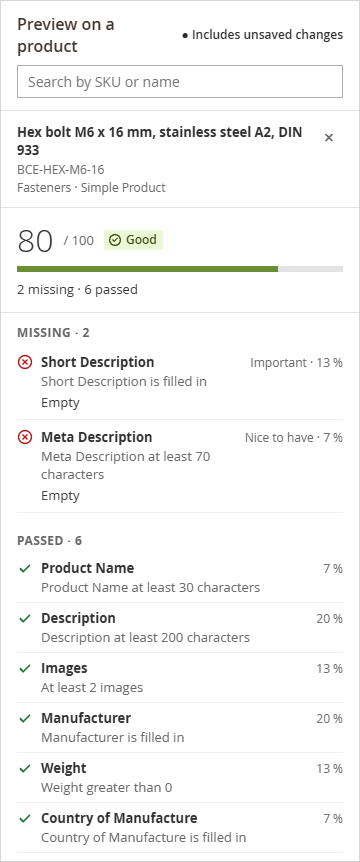
- Try the rules on a real product. In Preview on a product, search by SKU or name and pick a product. The preview scores it with the rules on the page, unsaved changes included. It updates when you leave a field you changed.
- Click Save and recalculate. The editor confirms the save and shows the rescore's progress. Save alone stores the rules and leaves the scores to the next recalculation (section 7.2).
4.2 Add a channel profile
A channel profile scores every product, whatever its attribute set, against what one sales channel needs.
- Click Create a rule set and set Kind to Channel profile.
- Choose the Channel. Suggestions exist for Google Merchant Center, Microsoft Merchant Center, Meta (Facebook and Instagram Shops), Pinterest, TikTok Shop, Amazon, eBay and Walmart Marketplace. Choose Custom for a distributor feed or any other channel. A Custom profile has no suggestions.
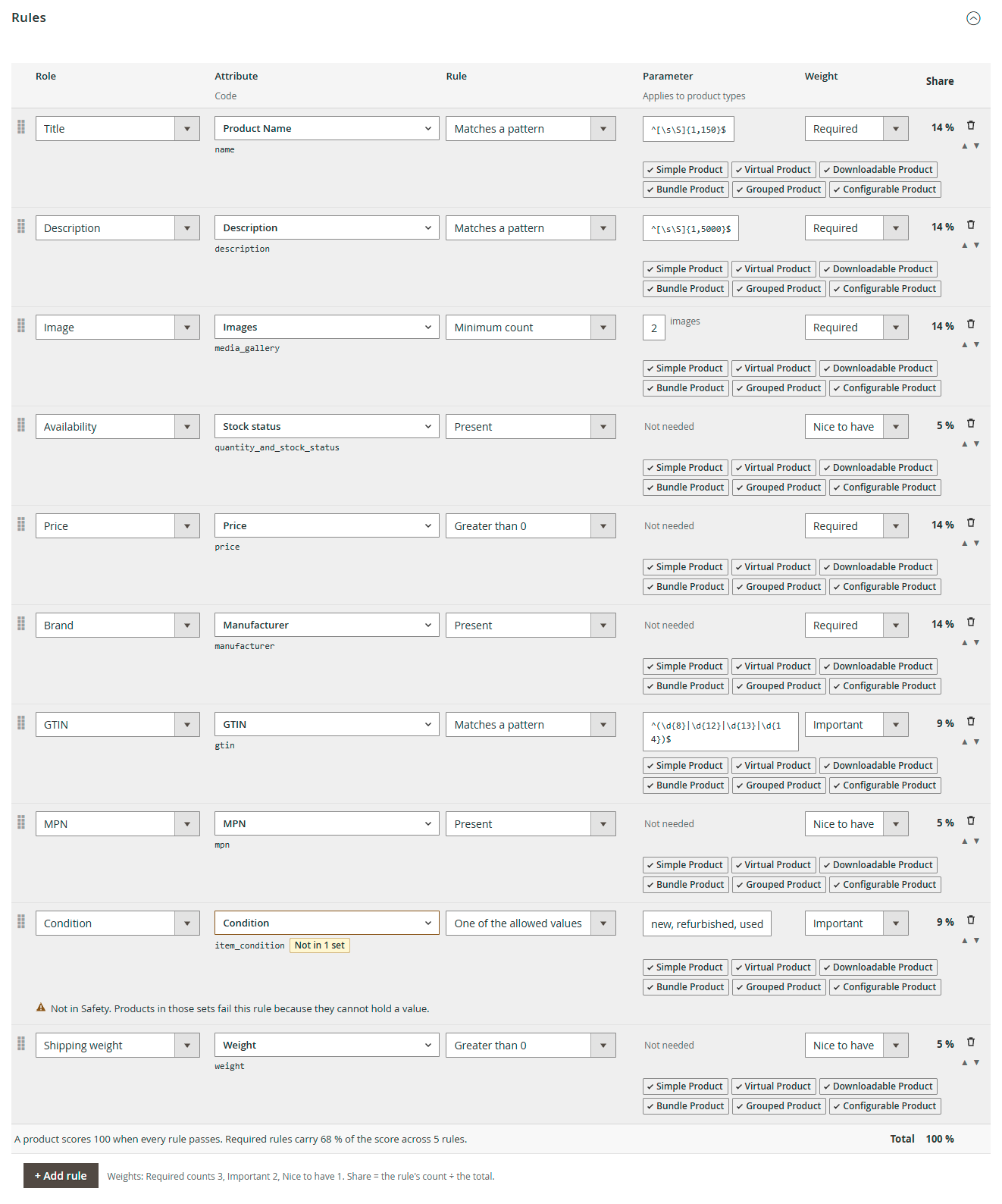
- The rules table gains a Role column: the channel's name for the field, such as Brand, GTIN or Condition. Click Add next to a field in the suggested list. The row arrives with its role, rule, parameter and weight filled in. Choose the attribute that holds the value in your store: your GTIN might live in
gtin,eanorupc. - Click Save and recalculate.
Every product then carries one more score for each enabled profile, beside its attribute set score.
Each suggested list was written from that channel's own documentation. Channels change their rules, so treat a suggestion as a starting point and the channel's current specification as the authority. Requirements that change by category, such as eBay item specifics or Amazon product type attributes, aren't suggested. Add them as your own rules once you know where you list.
4.3 Settings
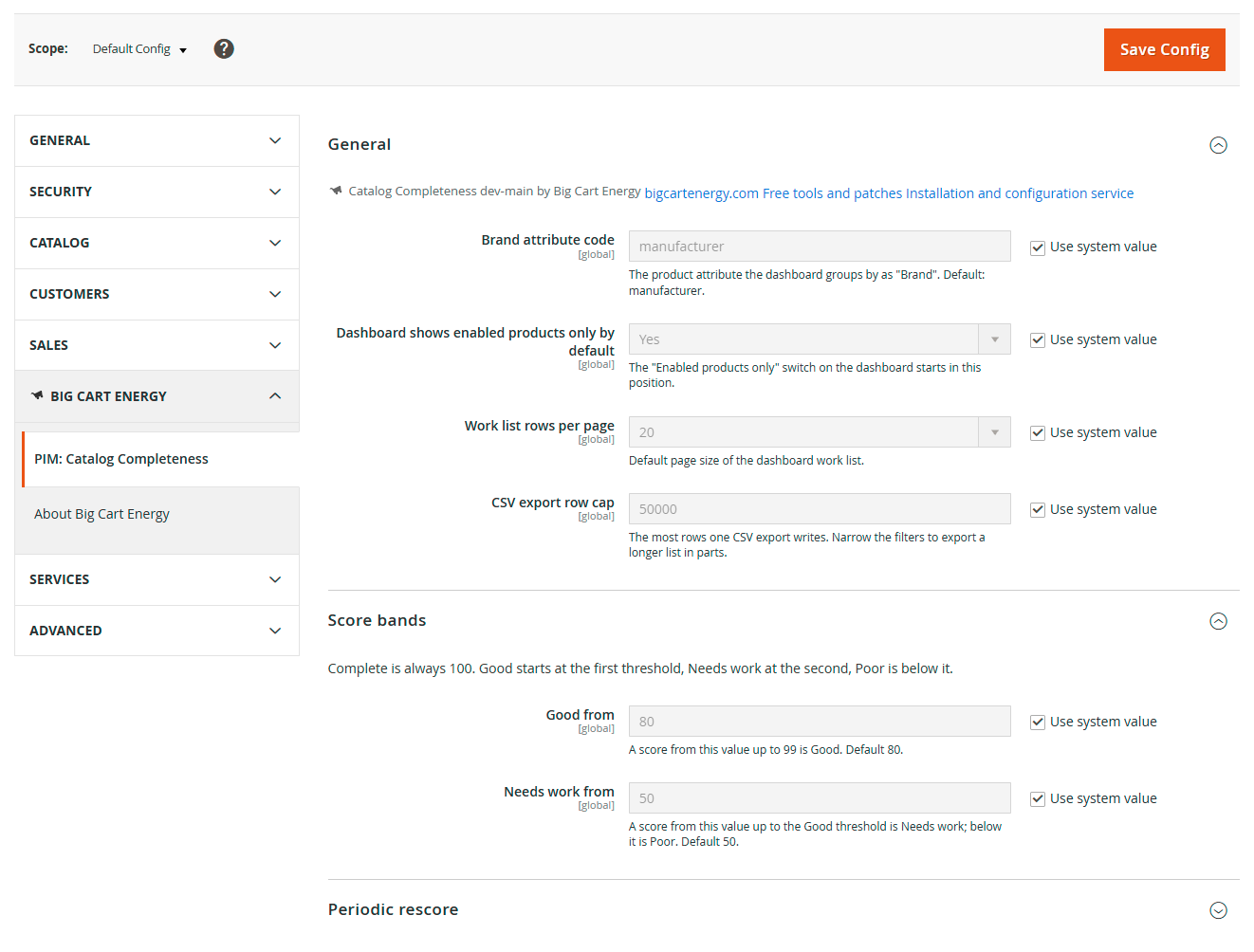
Go to Stores > Configuration > Big Cart Energy > PIM: Catalog Completeness, or Big Cart Energy > PIM: Catalog Completeness > Settings. The page has three groups:
General
| Field | Default | What it does |
|---|---|---|
| Brand attribute code | manufacturer | The attribute the dashboard groups by as "Brand" |
| Dashboard shows enabled products only by default | Yes | The starting position of the dashboard's "Enabled products only" switch |
| Work list rows per page | 20 | The work list's starting page size: 20, 50, 100 or 200 |
| CSV export row cap | 50000 | The most rows one export writes |
Score bands
| Field | Default | What it does |
|---|---|---|
| Good from | 80 | A score from here up to 99 is Good |
| Needs work from | 50 | A score from here up to the Good threshold is Needs work. Below it is Poor |
Periodic rescore
| Field | Default | What it does |
|---|---|---|
| Rescore on a schedule | Yes | Rescores the catalog from Magento cron on a schedule (section 7.5) |
| Schedule | 0 */6 * * *, every six hours | When the rescore runs |
| Products to rescore | Every product | Every product, or only the products changed since the last run |
| Products per batch | 500 | How many products a run scores at a time, from 50 to 5000 |
Good from must be higher than Needs work from, and both take a whole number from 1 to 99.
The General group opens with a line naming the module, its installed version and "by Big Cart Energy", with links to bigcartenergy.com, our free tools and patches, and our installation and configuration service.
4.4 The first calculation
Save and recalculate queues a rescore of every product the rule set covers. Magento's cron starts the queue consumer that works it, and the editor shows the progress. Without cron, run the calculation from the Magento root:
bin/magento bce:completeness:recalculateWhen it finishes, the dashboard fills in.
5. The scoring model
5.1 What a score means
A score says how much of what you require a product has, weighted by how much each requirement matters:
score = 100 × weight of the rules passed ÷ weight of the rules that apply, rounded
Only the rules that apply to the product's type count. A score reads 100 only when every rule passes: a product one rule short shows 99 at most, never a rounded-up 100.
A worked example from our demo store. The rule set "Fasteners core content" has eight rules with a total weight of 15. The product BCE-HEX-M6-16 passes Product Name, Description, Manufacturer, Weight and Country of Manufacture, which weigh 10. It fails Short Description, Images (it has two images, and the rule asks for three) and Meta Description. 100 × 10 ÷ 15 = 66.7, so it scores 67 and lands in Needs work.
No rules assigned. A product that no rule covers gets no score: no enabled attribute set rule set covers its attribute set, or none of that rule set's rules applies to its product type. The dashboard calls these products "No rules assigned", leaves them out of every average and lists them in a view of their own (section 6.8).
Bands. Every score falls in one of four bands:
| Band | Default range |
|---|---|
| Complete | 100 |
| Good | 80 to 99 |
| Needs work | 50 to 79 |
| Poor | below 50 |
Complete is always 100. The other two thresholds are settings (section 4.3).
5.2 The six rule types
Each rule checks one attribute with one rule type:
| Rule | Passes when |
|---|---|
| Present | The value isn't empty once spaces are trimmed. A 0 counts on number and Yes/No fields. A dropdown needs an option, a multiselect at least one value |
| Minimum length | The trimmed text has at least that many characters. HTML tags don't count on text editor fields such as Description |
| Minimum count | The product has at least that many enabled gallery images, or a multiselect has that many values selected. Hidden images don't count |
| Greater than 0 | The number is above zero |
| One of the allowed values | The option label or stored value matches one of your values, ignoring case |
| Matches a pattern | The value matches your regular expression |
The parameter each rule type takes, with an example:
| Rule | Parameter | Example |
|---|---|---|
| Present | Not needed | Manufacturer is filled in |
| Minimum length | Characters | Description at least 200 characters |
| Minimum count | Images, or selected values | At least 3 images |
| Greater than 0 | Not needed | Weight greater than 0 |
| One of the allowed values | Values separated by commas | Condition is one of 3 allowed values |
| Matches a pattern | A pattern body | GTIN matches the pattern below |
The pattern in the GTIN example:
^(\d{8}|\d{12}|\d{13}|\d{14})$Patterns. Enter the pattern body only, without delimiters or modifiers: ^[A-Z]{3}$, not /^[A-Z]{3}$/i. The editor checks each pattern when you save. It refuses a pattern that doesn't compile, and one that repeats a group that already repeats, such as (a+)+, because that can run for far too long. If a pattern still fails at run time, it fails its own rule and nothing else. A pattern checks the shape of a value, not its arithmetic, so it can't confirm a GTIN check digit.
Two attributes behave differently. Images stands for the product's gallery and takes Present or Minimum count. Stock status counts as present when the product has a stock item. Minimum count works on images and multiselect attributes only.
5.3 Weights
Each rule carries a weight: Required counts 3, Important 2 and Nice to have 1. A rule's share of the score is its count divided by the total for the rule set. The editor shows every share as you weigh, and the footer says how much of the score your Required rules carry. In "Fasteners core content", the two Required rules carry 40 % of the score.
5.4 Picking attributes
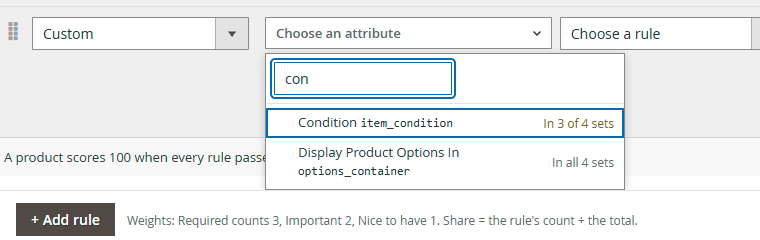
The picker lists every product attribute the admin shows, by label and code, plus Images and Stock status. Type to filter it. Beside each attribute it says how many of the relevant attribute sets contain it. For attribute set rules, those are the sets you chose. For a channel profile, they are all your attribute sets.
- In the chosen set, or In all 4 sets: every covered product can hold a value.
- In 3 of 4 sets: the row is tagged Not in 1 set, with the warning Not in Safety. Products in those sets fail this rule because they cannot hold a value. A product whose attribute set lacks the attribute fails that rule. Add the attribute to the missing sets, or accept the failure. In our demo store, the Safety set has no Condition attribute, so the Google profile's Condition rule fails for gloves and safety glasses.
Each attribute can have one rule per rule set. A second rule on the same attribute stops the save with "This attribute already has a rule. Use one rule per attribute."
5.5 Product types
Applies to product types names the types a rule judges: Simple, Virtual, Downloadable, Bundle, Grouped and Configurable, all six by default. A rule that doesn't apply to a product's type leaves its score alone. It neither passes nor fails.
Use it for fields that only some types carry. In our demo store, Weight greater than 0 applies to simple products only. Manufacturer and Country of Manufacture skip virtual and downloadable products, because Magento offers neither field on those types. So the virtual product "Cut-to-length service for threaded rod" is scored on 5 of the 8 rules, out of a weight of 9.
5.6 Rule sets, profiles and scope
- Attribute set rules cover the attribute sets you choose, and give each product its main score. The REST API marks this score
is_primary. - Channel profiles cover every product. Each enabled profile adds one more score per product. In a profile's scope, a product has no rules assigned only when none of the profile's rules applies to its product type.
- Scope. The dashboard's Rule set select switches the whole page between All attribute set rules and each enabled channel profile. The product page panel has the same select.
- A disabled rule set scores nothing. Disabled products keep their scores, and the dashboard leaves them out while Enabled products only is on.
6. Day-to-day use
6.1 The dashboard
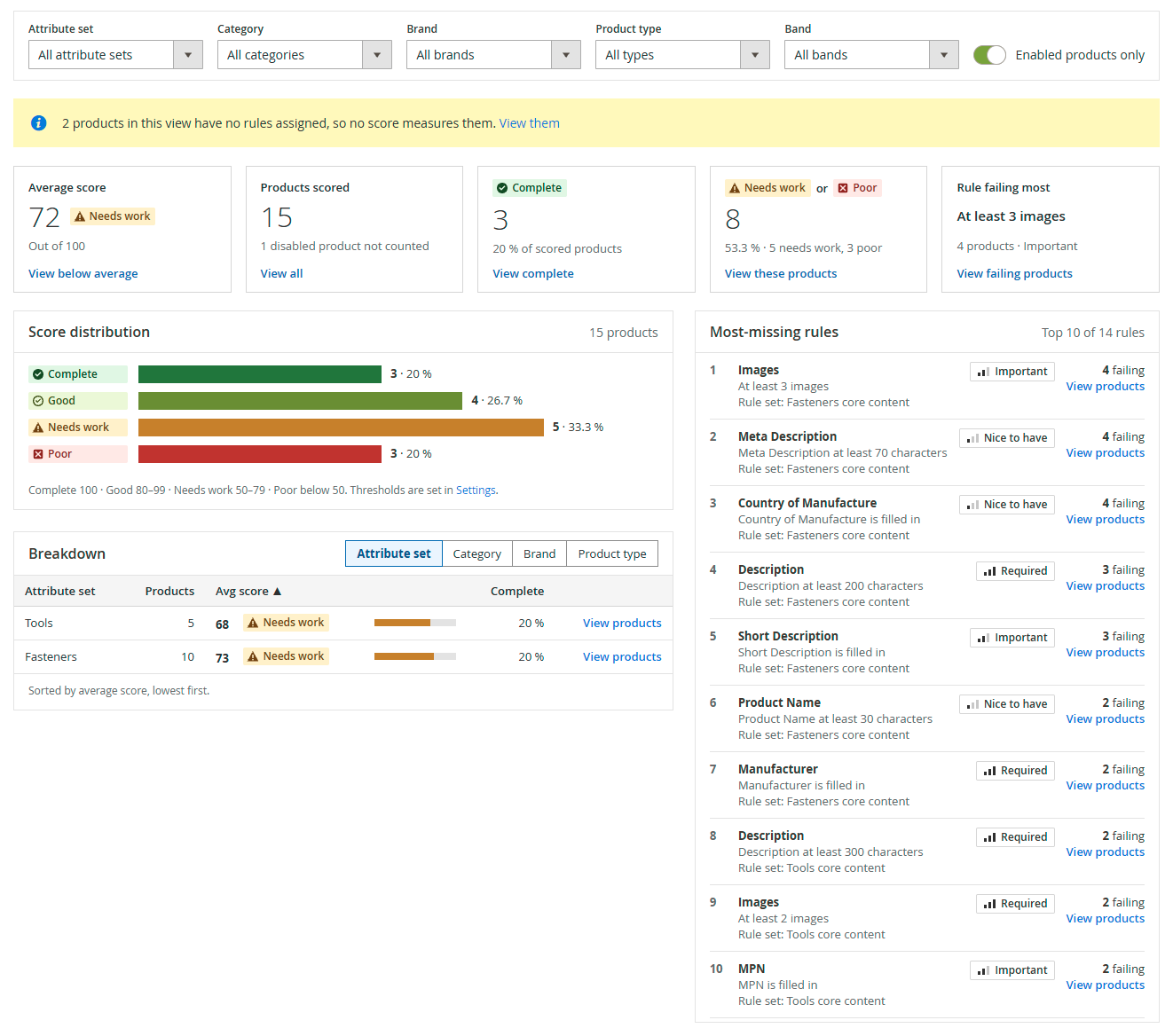
Open Big Cart Energy > PIM: Catalog Completeness > Dashboard. The dashboard answers three questions: how complete the catalog is, what is missing most, and which products to fix first.
- The top bar. Rule set sets the scope. Rule coverage switches between the scored products and the products with no rules assigned (section 6.8). Manage rule sets opens the rule set list. Export CSV and Recalculate act on the current scope.
- The status line says when the scores were calculated and how the index updates: "updated on save" or "updated by schedule".
- Filters: Attribute set, Category, Brand, Product type and Band, plus the Enabled products only switch. They apply to everything on the page. Active filters show as chips. Remove one with its ×, or all of them with Clear all.
- A notice under the filters counts the products in view that have no rules assigned, with a link to them: "2 products in this view have no rules assigned, so no score measures them. View them". It shows only when there are any.
- Five tiles: Average score, Products scored, Complete, Needs work or Poor and Rule failing most. Each tile is also a filter. Click it to filter the page, and click it again to clear it ("✓ Filtering · click to clear").
- Score distribution across the four bands.
- Breakdown by Attribute set, Category, Brand or Product type, lowest average first. View products filters the page to that row. A product in several categories counts in each.
- Most-missing rules: the ten rules products fail most, each with its weight, its failing count and View products.
6.2 The work list
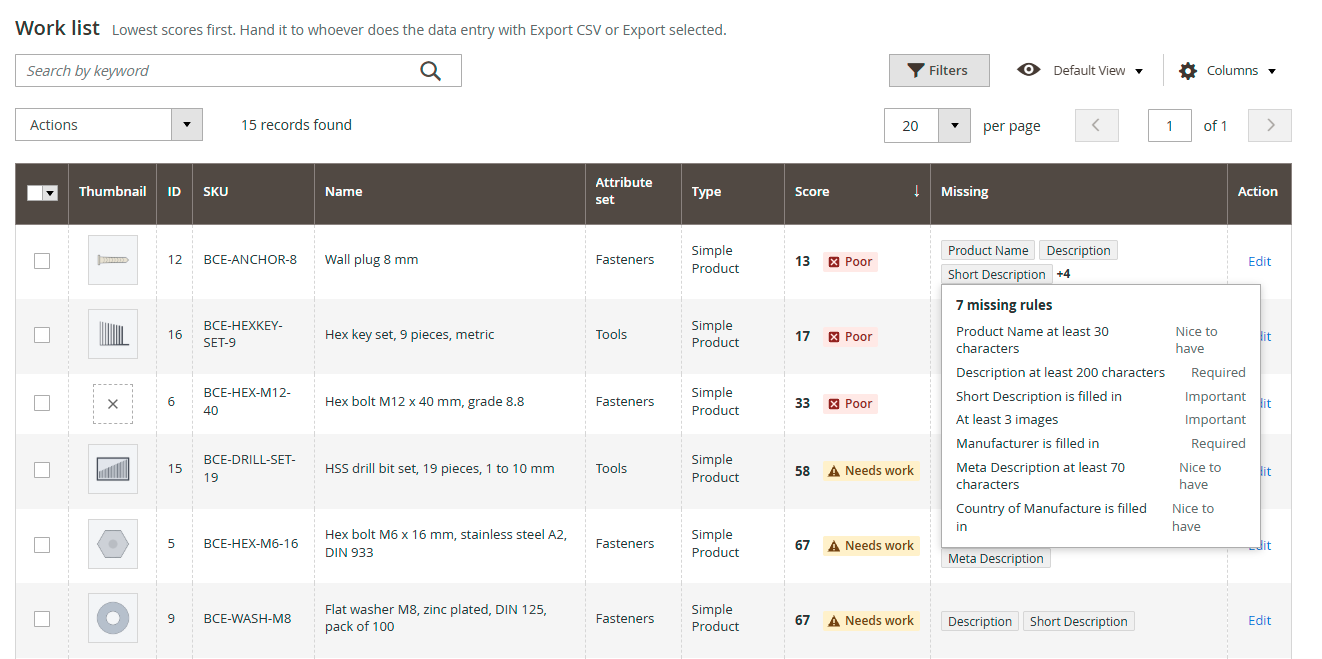
The Work list at the bottom of the dashboard holds every scored product in scope, lowest score first.
| Column | Shows |
|---|---|
| Thumbnail | The product's thumbnail image |
| ID, SKU, Name | The product |
| Attribute set, Type | The product's attribute set and type |
| Score | The score and its band |
| Missing | The rules the product fails. Hover over the cell, or reach it with the keyboard, to see the full list |
| Last scored | When the score was calculated |
| Action | Edit opens the product |
- Search by keyword finds products by SKU or name.
- Filters adds a band filter and a filter for most columns, such as a score range.
- Columns shows and hides columns, and Default View saves the layout as a named view.
- Choose 20, 50, 100 or 200 rows a page.
6.3 Mass actions
Tick the products you want, or use the checkbox menu in the header to select them all. Then open Actions:
- Recalculate rescores the selected products at once and says how many it rescored.
- Export selected downloads a CSV of the selected rows.
Both act in the current scope.
6.4 Exports
Export CSV, in the top bar, exports what the dashboard selects: the scope, the filters and any tile you've pressed. Export selected, under the work list's Actions, exports the rows you tick, or every row the work list shows when you select them all. The file is named catalog-completeness- plus the date, and has these columns:
| Column | Holds |
|---|---|
| ID, SKU, Name | The product |
| Attribute set, Type | Its attribute set and product type |
| Score, Band | The score in the current scope. In the no-rules view, Score is empty and Band reads "No rules assigned" |
| Missing | Every rule it fails, separated by " | " |
| Scored at | When the score was calculated |
Two rows from our demo store (the dates are left out here):
ID,SKU,Name,"Attribute set",Type,Score,Band,Missing,"Scored at"
12,BCE-ANCHOR-8,"Wall plug 8 mm",Fasteners,"Simple Product",13,Poor,"Product Name at least 30 characters | Description at least 200 characters | Short Description is filled in | At least 3 images | Manufacturer is filled in | Meta Description at least 70 characters | Country of Manufacture is filled in",...
6,BCE-HEX-M12-40,"Hex bolt M12 x 40 mm, grade 8.8",Fasteners,"Simple Product",33,Poor,"Description at least 200 characters | At least 3 images | Manufacturer is filled in | Meta Description at least 70 characters | Country of Manufacture is filled in",...
An export writes at most CSV export row cap rows (50,000 by default). To export a longer list, narrow the filters and export it in parts. A cell that starts with =, +, -, @, a tab or a carriage return gets a leading apostrophe, so a spreadsheet opens it as text, not as a formula.
6.5 On the product page
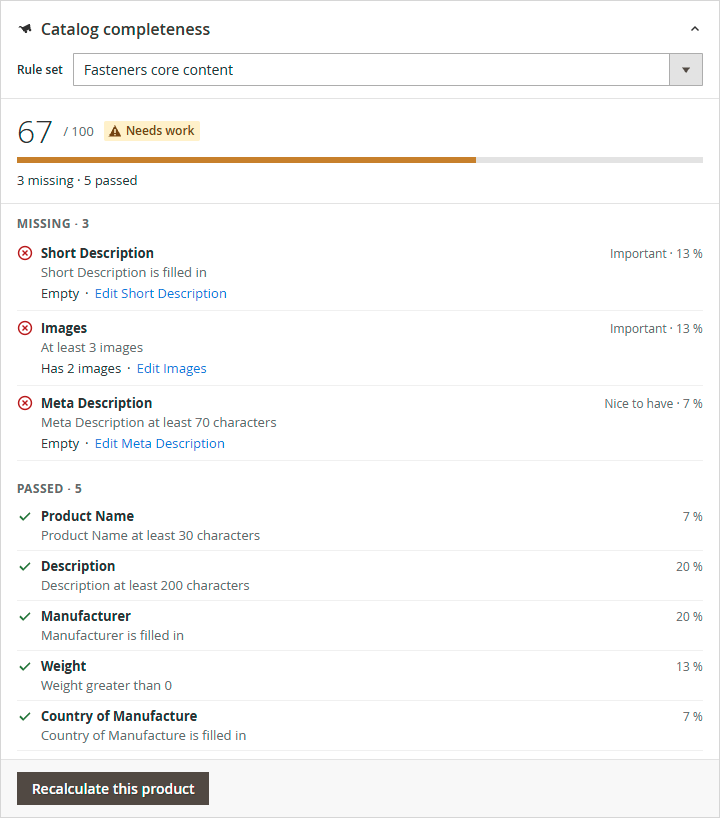
Open any product under Catalog > Products. The Catalog completeness panel sits below the product form's sections.
- The score out of 100, its band, and how many rules the product misses and passes.
- Missing: each failed rule, what the product has now ("Empty", "Has 2 images") and a link to the field that fixes it, such as Edit Short Description.
- Passed: each rule the product passes, with its share of the score.
- Rule set switches between the attribute set score and each channel profile.
- Recalculate this product rescores the product at once. The line beside it says when the stored score was calculated, or "Not stored yet".
The arrow in the panel's corner collapses it to the score and band.
6.6 In the product grid
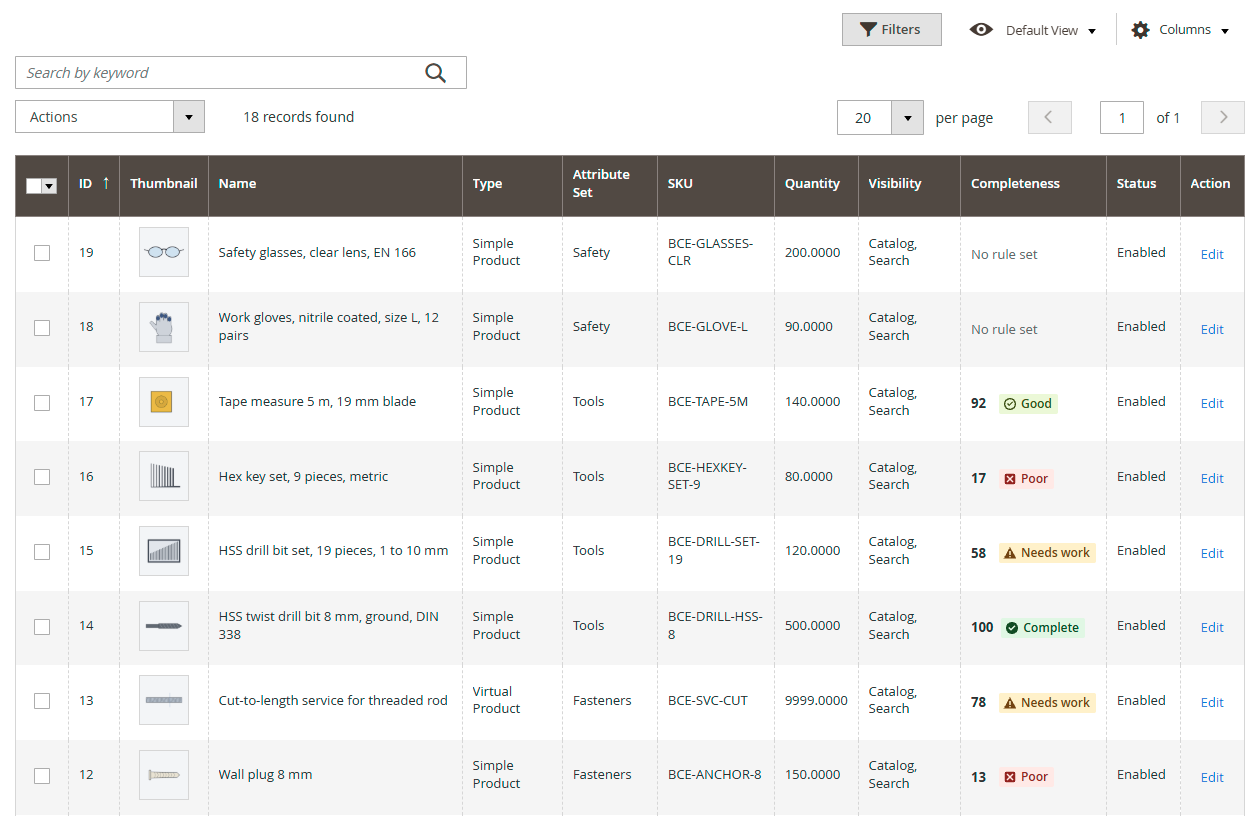
Catalog > Products gains a Completeness column: the attribute set score with its band. It sorts, and Filters gives it a from-to range. A product without an attribute set score shows "No rule set": either it has no rules assigned, or its score hasn't been calculated yet. If the column is missing, add it under Columns.
6.7 Managing rule sets
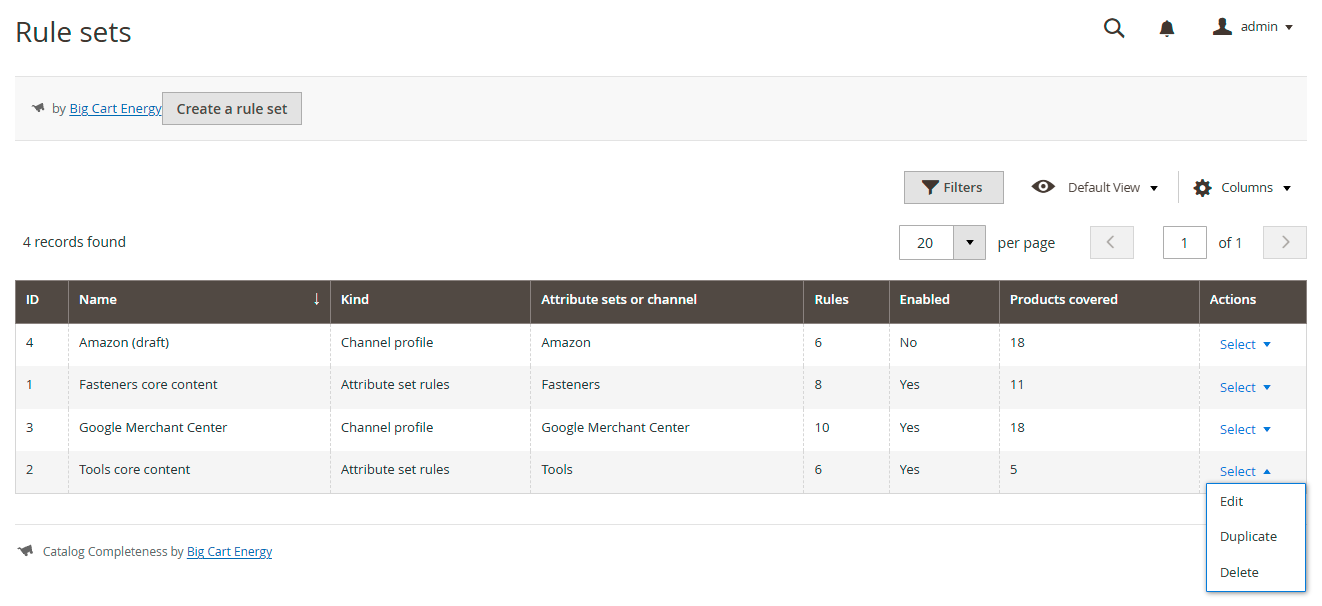
Go to Big Cart Energy > PIM: Catalog Completeness > Rule sets. The grid lists every rule set with its Kind, its Attribute sets or channel, its number of Rules, whether it is Enabled and how many Products covered. Actions offers:
- Edit opens the editor. Without the Edit rule sets right, it reads View and the editor opens read-only.
- Duplicate makes a disabled copy named "Copy of …". A copy of attribute set rules has no attribute sets yet: choose them, then enable it.
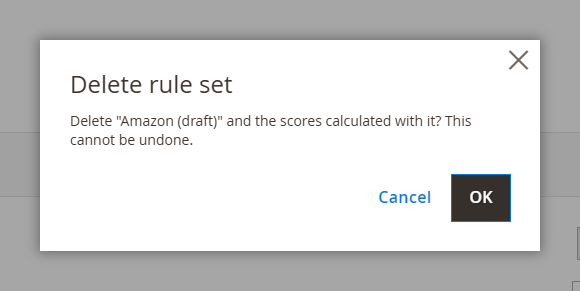
- Delete asks first, in the dialog Delete rule set: OK removes the rule set and the scores calculated with it, Cancel keeps it. This can't be undone. The editor's own Delete button asks the same, with Cancel and Delete.
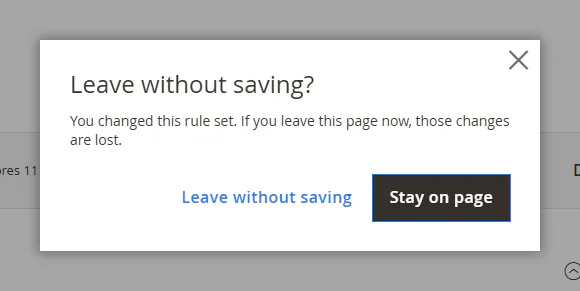
The editor protects your changes. If you leave with unsaved changes, it asks first: Stay on page keeps them, Leave without saving drops them. If a row is incomplete, Save stops and a summary at the top links to each row that needs fixing.
6.8 Products with no rules assigned
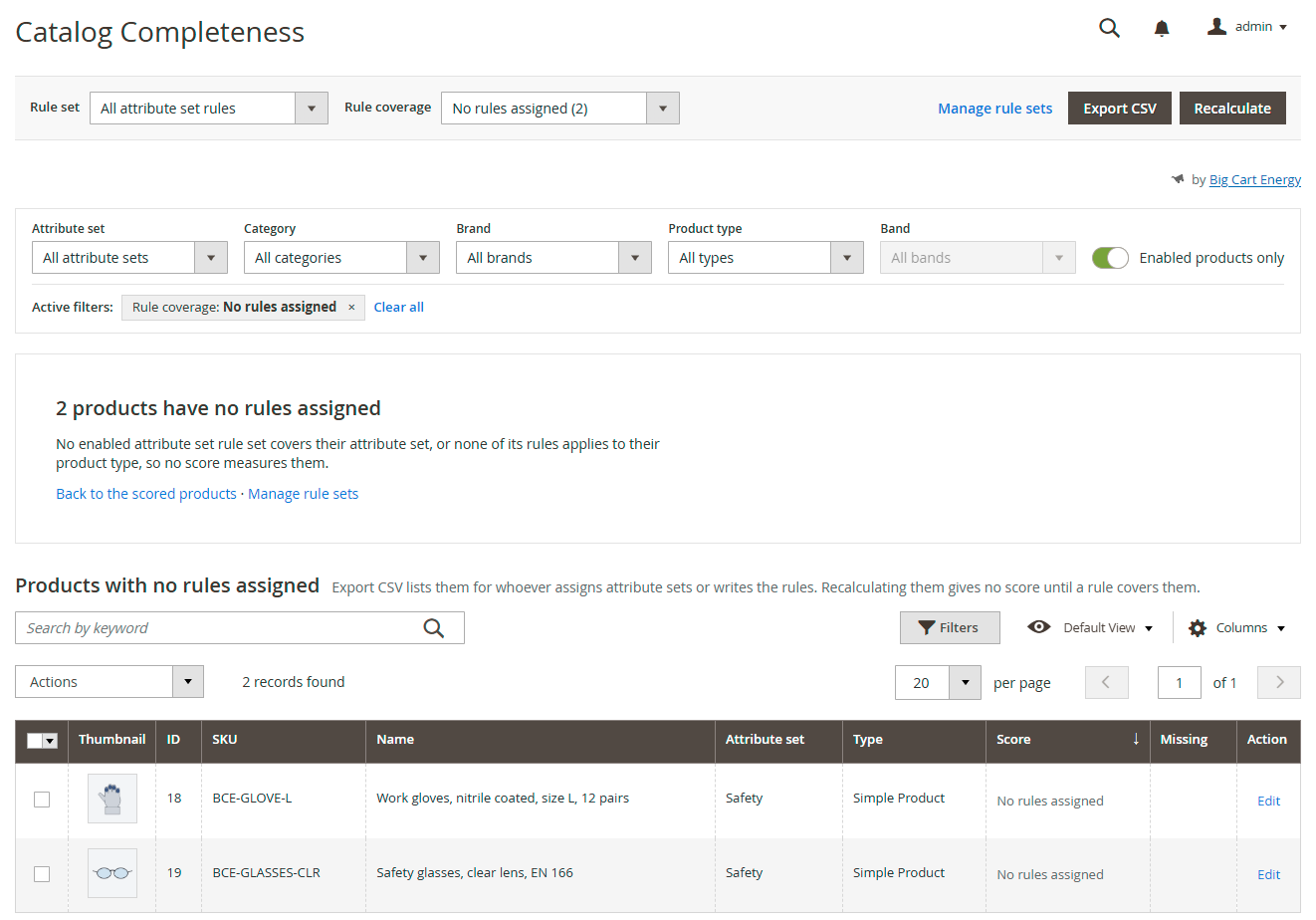
A product with no rules assigned carries no score, so the scored view leaves it out. This view finds those products, so none slips past unmeasured. In the scope All attribute set rules, a product has no rules assigned when no enabled attribute set rule set covers its attribute set, or none of that rule set's rules applies to its product type. In a channel profile's scope, it has none when none of the profile's rules applies to its product type, because a profile reaches every product.
Open the view from the notice under the filters (View them), or set Rule coverage in the top bar to No rules assigned. The option shows the count, for example "No rules assigned (2)". The view shows:
- The heading, for example "2 products have no rules assigned", with the reason: "No enabled attribute set rule set covers their attribute set, or none of its rules applies to their product type, so no score measures them." In a profile's scope, the reason names the profile.
- The links Back to the scored products and Manage rule sets.
- The filter chip "Rule coverage: No rules assigned". The filters on the products themselves still apply. Band is grayed out, and the tiles and the work list's Band, Score and Last scored filters step aside, because they need a score. They step aside even when the work list kept them from the scored view.
- The work list headed Products with no rules assigned: "No rules assigned" in the Score cell and nothing under Missing. Keyword search, column filters and paging work as usual.
What you can do here:
- Export CSV and Export selected list these products, with "No rules assigned" in the Band column. Hand the file to whoever assigns attribute sets or writes the rules.
- Recalculate under Actions rescores none of them and says why: "These 2 products have no rules assigned, so recalculating them gives no score. Add their attribute sets to an attribute set rule set, or rules for their product types, then recalculate."
- Clear all in the filter bar, or Back to the scored products, returns to the scored view.
The view reads coverage from the rule sets as they are now, so it is right even before a recalculation. When every product in scope is covered, it says "Every product here has rules assigned". In our demo store, no attribute set rule set covers the Safety set, so the gloves and the safety glasses are listed here, while the Google profile's scope covers every product.
7. Keeping scores fresh
Scores live in a Magento indexer, so they follow the indexer's mode. The periodic rescore catches what the indexer can't see. This section covers both.
7.1 The two indexer modes
The indexer is Catalog completeness score, listed under System > Tools > Index Management.
- Update on Save: a product save, a mass attribute update or an import rescores the products it touched, in the same request.
- Update by Schedule: Magento collects the changes as they happen and its indexer cron applies them, about once a minute when cron runs. Switching to this mode creates the changelog table
bce_completeness_score_cland adds the module's statements to the catalog tables' triggers.
A new install starts in Update by Schedule on 2.4.8 and 2.4.9, and in Update on Save on 2.4.7 and earlier. Set the mode you want in Index Management, or from the command line:
bin/magento indexer:set-mode schedule bce_completeness_score # or: realtime7.2 What rescores a product
| Change | Update on Save | Update by Schedule |
|---|---|---|
| A product saved in the admin or over REST | Rescored at once | Rescored at the next indexer cron run |
| Update attributes on several products | Rescored at once | At the next indexer cron run |
| A product import (System > Data Transfer > Import) | Rescored after each batch | At the next indexer cron run |
| A sync that writes straight to the database | At the next periodic rescore | Product attribute and image changes at the next indexer cron run. Stock-only changes at the next periodic rescore |
| A rule set saved with Save | The scores are marked out of date, and Magento's message bar says an indexer is invalid. Magento's indexer cron rescores everything at its next run | The same |
| A rule set saved with Save and recalculate | Its products are queued for a rescore | The same |
7.3 Recalculating
| Where | What it rescores | How |
|---|---|---|
| Dashboard, Recalculate | Every product in the current scope. From "All attribute set rules", every rule set | Queued |
| Editor, Save and recalculate | The rule set's products | Queued |
| Work list, Actions > Recalculate | The selected products | At once |
| Product page, Recalculate this product | That product | At once |
REST, POST …/recalculate | That product | At once |
| The periodic rescore | Every product, or only changed ones | On its schedule |
| Command line | Everything, one rule set or one product | In the foreground |
Queued work goes to Magento's message queue, on the topic bce_completeness.recalculate. Magento's cron starts the consumer bceCompletenessRecalculate every minute through its consumers_runner job. To run it yourself:
bin/magento queue:consumers:start bceCompletenessRecalculate --single-thread --max-messages=10While a queued run is active, the dashboard counts the products done. If cron isn't available, recalculate from the command line. It runs in the foreground with a progress bar:
bin/magento bce:completeness:recalculate                 # every product
bin/magento bce:completeness:recalculate --ruleset=3     # one rule set, by id
bin/magento bce:completeness:recalculate --product=1042  # one product, by id
7.4 Syncs that write straight to the database
Some ERP connectors, scripts and migrations write product data straight into Magento's tables. Magento's save events never fire for those writes, so what the module sees depends on the mode:
- Update on Save sees none of them. The periodic rescore catches them on its schedule.
- Update by Schedule sees writes to the product, attribute value and gallery tables, because the database triggers fire whoever writes. Changes that touch only stock, or only an attribute option's label, wait for the periodic rescore.
If your store has such a sync, keep the periodic rescore on. It is on by default. To catch a sync's changes straight away, run bin/magento bce:completeness:recalculate in your crontab after the sync finishes.
7.5 The periodic rescore
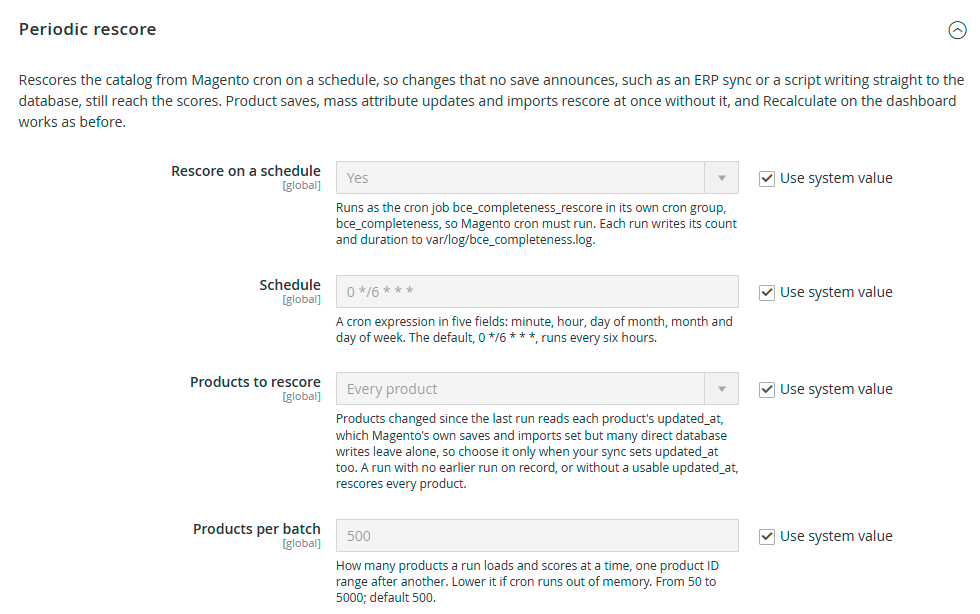
The periodic rescore rescores the catalog from Magento cron on a schedule, so changes that no save announces still reach the scores. It runs as the cron job bce_completeness_rescore in its own cron group, bce_completeness, which Magento runs in a separate process, as it does its indexer group.
Set it up under Stores > Configuration > Big Cart Energy > PIM: Catalog Completeness, in the Periodic rescore group:
| Field | Default | What it does |
|---|---|---|
| Rescore on a schedule | Yes | Turns the rescore on or off. When it is off, the job stays in Magento's cron schedule and ends at once |
| Schedule | 0 */6 * * * | A cron expression in five fields: minute, hour, day of month, month and day of week. The default runs every six hours, on the hour |
| Products to rescore | Every product | Every product, or Products changed since the last run (updated_at) |
| Products per batch | 500 | How many products a run loads and scores at a time, one range of product IDs after another. From 50 to 5000. Lower it if cron runs out of memory |
The last three fields show only while Rescore on a schedule is Yes.
The schedule. Each field takes *, a number, a range such as 1-5, a list such as 0,30, or a step on * such as */15. Month and day names, such as jan and mon, count as numbers. The save refuses anything else, with a message, so a typing error can't stop Magento's cron from planning the group.
Changed since the last run. This mode rescores only the products whose updated_at moved since 15 minutes before the last completed run started. Magento's own saves and imports set updated_at. Many direct database writes don't, so choose this mode only when your sync sets it too. A run with no earlier run on record rescores every product.
What a run leaves behind. Each run writes one line to var/log/bce_completeness.log: what it covered, the products scored, the batches and how long it took. For example: "Periodic rescore (every product): 18420 products in 37 batches of up to 500, 41.2 s." When no rule set has rules, the run is skipped and the log says so. A run that fails logs how many products it scored before the error, and Magento marks the cron job as failed.
Cron. A crontab that runs plain bin/magento cron:run covers the group. If yours names cron groups one by one, add a line with --group=bce_completeness. The rescore never replaces Recalculate: to rescore at once, use the dashboard or the command line (section 7.3).
8. REST API
Three routes, behind a Magento admin or integration token and the same rights as the admin screens:
GET /V1/bce-completeness/products/:productId/scores- Right: Dashboard
- Returns: The product's scores, one entry per rule set that applies to it, with the band, the missing rules and a state
GET /V1/bce-completeness/rulesets- Right: Rule sets
- Returns: Every rule set with its rules
POST /V1/bce-completeness/products/:productId/recalculate- Right: Recalculate scores
- Returns: Rescores the product now and returns its new scores
No route accepts a score from the caller. Requests without a valid token get HTTP 401.
Get a token, then read a product's scores:
curl -s -X POST https://shop.example.com/rest/V1/integration/admin/token \
  -H "Content-Type: application/json" \
  -d '{"username":"api-user","password":"<password>"}'

curl -s https://shop.example.com/rest/V1/bce-completeness/products/5/scores \
  -H "Authorization: Bearer <token>"
The response for product 5 in our demo store, BCE-HEX-M6-16 (the times are shown as a format here):
[
    {
        "product_id": 5,
        "ruleset_id": 1,
        "ruleset_name": "Fasteners core content",
        "is_primary": true,
        "score": 67,
        "band": "needs_work",
        "band_label": "Needs work",
        "passed_weight": 10,
        "total_weight": 15,
        "missing": [
            "Short Description is filled in",
            "At least 3 images",
            "Meta Description at least 70 characters"
        ],
        "scored_at": "YYYY-MM-DD hh:mm:ss",
        "state": "scored"
    },
    {
        "product_id": 5,
        "ruleset_id": 3,
        "ruleset_name": "Google Merchant Center",
        "is_primary": false,
        "score": 95,
        "band": "good",
        "band_label": "Good",
        "passed_weight": 21,
        "total_weight": 22,
        "missing": [
            "MPN is filled in"
        ],
        "scored_at": "YYYY-MM-DD hh:mm:ss",
        "state": "scored"
    }
]
scored_at is in UTC.
Every entry has a state:
| State | Means |
|---|---|
scored | The entry carries a score |
no_rules_assigned | No rule applies to the product in that rule set's scope |
not_calculated | Rules apply, but no score has been calculated yet |
An entry without a score has no score, band, band_label or scored_at key at all, because Magento's REST output leaves out values that are null. Read state rather than testing score for null. When no score comes from the attribute set rules, the response starts with one entry for them: is_primary true, ruleset_id 0 and the state that says why. The channel profiles' entries follow. Product 18 in our demo store, a pair of work gloves in the Safety set, which no attribute set rule set covers:
[
    {
        "product_id": 18,
        "ruleset_id": 0,
        "ruleset_name": "",
        "is_primary": true,
        "passed_weight": 0,
        "total_weight": 0,
        "missing": [],
        "state": "no_rules_assigned"
    },
    {
        "product_id": 18,
        "ruleset_id": 3,
        "ruleset_name": "Google Merchant Center",
        "is_primary": false,
        "score": 91,
        "band": "good",
        "band_label": "Good",
        "passed_weight": 20,
        "total_weight": 22,
        "missing": [
            "Condition is one of 3 allowed values"
        ],
        "scored_at": "YYYY-MM-DD hh:mm:ss",
        "state": "scored"
    }
]
POST /V1/bce-completeness/products/:productId/recalculate returns the same shape, freshly calculated, placeholder entry included. GET /V1/bce-completeness/rulesets returns each rule set's id, name, kind, channel, description, whether it is enabled, its attribute sets and its rules.
On the product itself. Products loaded through Magento's product repository, in the admin and over REST (GET /V1/products/:sku), carry three read-only extension attributes:
bce_completeness_score: the attribute set score, left out when there is none;bce_completeness_missing: the labels of the rules the product fails;bce_completeness_state:scored,no_rules_assignedornot_calculated, for that score.
Sending them on a product save changes nothing.
9. Troubleshooting
Admin notices
| Notice | What it means | What to do |
|---|---|---|
| Create a rule set to start scoring your catalog | No rule set exists yet | Create one (section 4) |
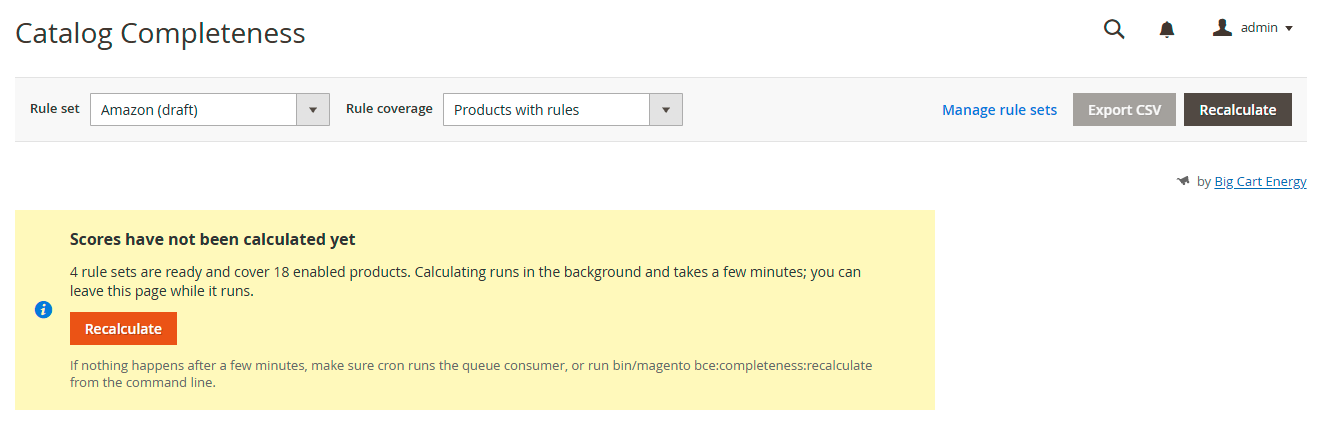
| Scores have not been calculated yet | Rule sets exist, but nothing in this scope has been calculated | Click Recalculate, or run the command line |
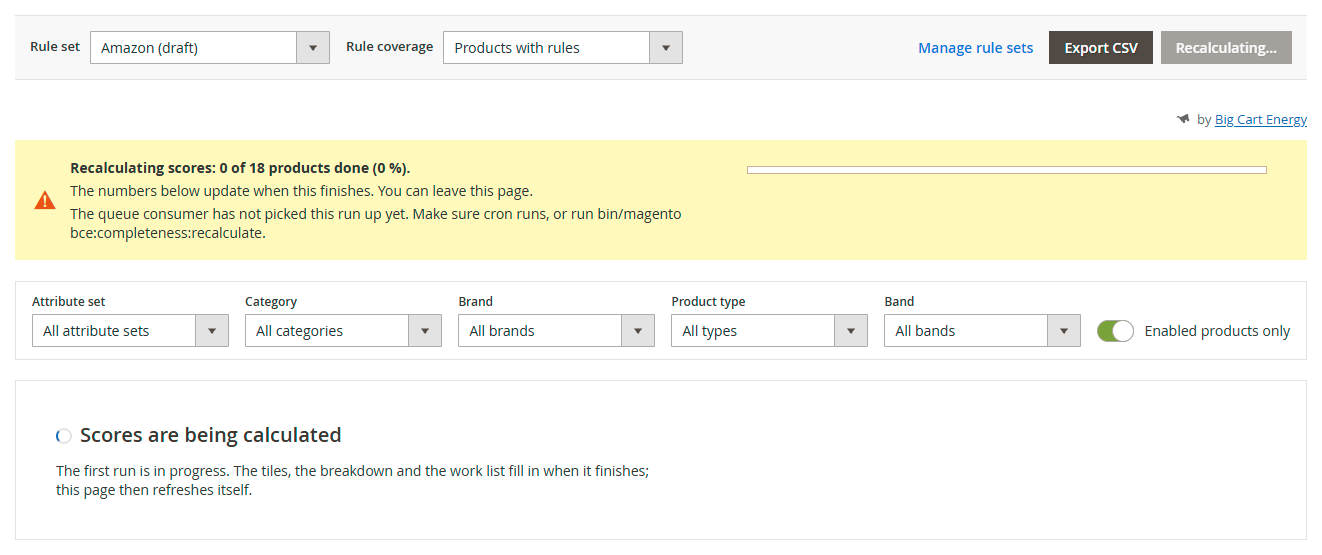
| Scores are being calculated | The first run in this scope is under way. You see this when you open or reload the page while it runs | Wait. The page refreshes itself when the run finishes |
| Recalculating scores: … products done | A queued run is active. The figures below it are from the last complete run | Nothing. You can leave the page |
| The queue consumer has not picked this run up yet | The run has waited more than ten minutes for a queue consumer | Check that cron runs, or run the consumer or the command line (section 7.3) |
| Scores are out of date | Rules changed after the last calculation, so the index is marked as needing a reindex | Click Recalculate now, or let Magento's indexer cron catch up |
| The last recalculation failed | A run stopped part way. The scores shown are from the last complete run. The notice quotes the indexer's message | Read the message, fix the cause, then click Try again. Open Index Management shows the indexer |
| No products match these filters | The filters exclude every product | Remove a filter, or Clear all filters |
| … products in this view have no rules assigned | No rule covers those products, so they carry no score | Click View them, then cover them with a rule set (section 6.8) |
| These … products have no rules assigned, so recalculating them gives no score | You recalculated products from the no-rules view | Add their attribute sets to an attribute set rule set, or rules for their product types, then recalculate |
| One or more indexers are invalid. Make sure your Magento cron job is running. (Magento's message bar) | A rule set was saved without recalculating, so the completeness index is marked as needing a reindex | Click Recalculate with the scope on All attribute set rules, or let Magento's indexer cron run. The bar goes once the index is valid again |
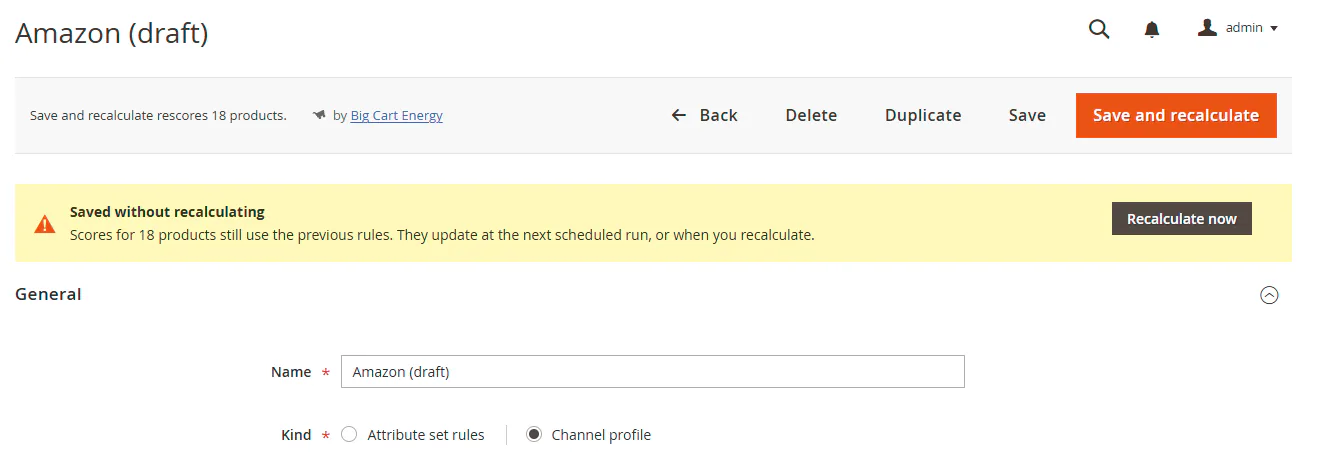
| Saved without recalculating (editor) | You clicked Save. The rule set's products still carry scores from the previous rules | Click Recalculate now, or wait for the next scheduled run |
| You saved the rule set. Rescoring … (editor) | Save and recalculate queued the rule set's products | Nothing. The dashboard updates when it finishes |
| You can view this rule set but not change it (editor) | Your role lacks the Edit rule sets right for PIM: Catalog Completeness | Ask an administrator (section 3) |
| … rules need fixing before you can save (editor) | One or more rows are incomplete or invalid | Follow the links to each row |
| The export failed. The details are in the Magento exception log. | An export hit an unexpected error | Read the exception log, fix the cause, then export again |
| The recalculation could not be started. The details are in the Magento exception log. | A recalculation hit an unexpected error | Read the exception log, fix the cause, then try again |
| The schedule is not a cron expression the periodic rescore accepts (settings) | The Schedule field holds something the rescore can't plan | Use five fields, each *, a number, a range, a list or a step on * (section 7.5) |
The exception log is var/log/exception.log.
Common questions
I saved a rule set and the scores didn't change. Save marks the scores out of date. They change when something recalculates: Magento's indexer cron, Recalculate, the periodic rescore or the command line. Use Save and recalculate to queue it straight away.
A recalculation stays at 0 %. Nothing is consuming the queue. Check that Magento's cron runs, and that cron_run hasn't switched off the consumers_runner job in app/etc/env.php. Or run the consumer or the command line yourself (section 7.3).
The periodic rescore doesn't seem to run. Check that Rescore on a schedule is Yes, that Magento's cron runs, and that your crontab covers the group bce_completeness. Each run writes a line to var/log/bce_completeness.log, and a skipped or failed run says why there.
A product isn't in the work list. It has no rules assigned in this scope. Set Rule coverage to No rules assigned to find it, then add its attribute set to an attribute set rule set, or a rule for its product type. Channel profiles may still score it: switch the scope to see.
The product grid shows "No rule set". The product has no attribute set score: either no rules are assigned to it, or its score hasn't been calculated yet. The dashboard's no-rules view tells the two apart.
A field is filled in, but its rule fails. Check in this order:
- Is the attribute in the product's attribute set? A product can't hold a value for an attribute its set lacks, so the rule fails. The picker warns about this.
- Does the value pass the rule, not just exist? A nine-word description is filled in, and still fails "Description at least 200 characters".
- Is the value stored for all store views? The module reads the default value, the one you see with Scope: All Store Views. A value entered only for one store view doesn't count.
- For images: is the image hidden? Hidden images don't count.
The export stops short of the full list. It hit CSV export row cap. Narrow the filters and export in parts, or raise the cap.
The dashboard leaves some products out. Enabled products only is on. The Products scored tile says how many disabled products it skipped.
Does it work on Adobe Commerce? Not in this version. It is built for Magento Open Source, which stores product data by entity_id. Adobe Commerce stores versioned product data by row_id.
10. Uninstall
Test the removal on staging first, with a backup, as for the installation.
Remove the module and its data. Run Magento's uninstall command. It takes the indexer out of Update by Schedule, drops the six tables and the changelog table, removes the indexer, queue, configuration, cron schedule and flag rows, and then removes the package with Composer. Magento puts the store in maintenance mode while it runs. The log file var/log/bce_completeness.log stays. Delete it by hand if you like.
The command uninstalls this module only. The Core module stays while something else requires bigcartenergy/module-core: another Big Cart Energy module, or your store's own composer.json. If you installed Catalog Completeness alone, Composer removes Core with it. To keep Core, run composer require bigcartenergy/module-core before the uninstall.
bin/magento module:uninstall BigCartEnergy_CatalogCompleteness --remove-dataRemove the code and keep the data. Run these steps in this order. The tables and settings stay in the database:
bin/magento module:disable BigCartEnergy_CatalogCompleteness
composer remove bigcartenergy/module-catalog-completeness
bin/magento setup:upgrade
bin/magento setup:di:compile   # production mode
bin/magento cache:cleanNever run setup:upgrade while the module is disabled but still installed.
Magento reads table declarations only from enabled modules but whitelists from every installed one, so that setup:upgrade drops the six tables, with the rule sets and scores in them. composer remove takes the whitelist away first, which is why it comes before setup:upgrade above.
The Core module. bigcartenergy/module-core can go once no other Big Cart Energy module needs it. On the keep-data path, Composer removes it with the module when nothing else requires it. To remove both explicitly, name both modules in the first two steps:
bin/magento module:disable BigCartEnergy_CatalogCompleteness BigCartEnergy_Core
composer remove bigcartenergy/module-catalog-completeness bigcartenergy/module-core
Then run the remaining steps as above. Product saves keep working during and after the uninstall, in either indexer mode.
11. Support
- Email: hello@bigcartenergy.com
- Documentation, and our installation and configuration service: bigcartenergy.com/tools/catalog-completeness
- Bug reports: github.com/bigcartenergy/module-catalog-completeness/issues
The module is open-source software under the Open Software License 3.0 and, apart from the license's own warranty of provenance, comes with no warranty. Test every change on staging first.
12. Quick reference
Where things are
| Screen | Path |
|---|---|
| Dashboard and work list | Big Cart Energy > PIM: Catalog Completeness > Dashboard |
| Rule sets | Big Cart Energy > PIM: Catalog Completeness > Rule sets |
| Settings | Big Cart Energy > PIM: Catalog Completeness > Settings, which opens Stores > Configuration > Big Cart Energy > PIM: Catalog Completeness |
| No rules assigned | Dashboard > Rule coverage > No rules assigned |
| Product panel | Catalog > Products > edit a product |
| Indexer | System > Tools > Index Management > Catalog completeness score |
| Rights | System > Permissions > User Roles > Role Resources > Big Cart Energy > PIM: Catalog Completeness |
Rule types: Present · Minimum length · Minimum count · Greater than 0 · One of the allowed values · Matches a pattern
Weights: Required 3 · Important 2 · Nice to have 1
Score: 100 × weight passed ÷ weight that applies, rounded. 100 only when every rule passes. No rule applies: "No rules assigned", no score.
Bands (defaults): Complete 100 · Good 80–99 · Needs work 50–79 · Poor below 50
Periodic rescore (defaults): on · 0 */6 * * * · every product · 500 per batch · cron group bce_completeness · log var/log/bce_completeness.log
Channels with suggestions: Google Merchant Center · Microsoft Merchant Center · Meta (Facebook and Instagram Shops) · Pinterest · TikTok Shop · Amazon · eBay · Walmart Marketplace. Custom has none.
Commands
bin/magento bce:completeness:recalculate [--ruleset=ID] [--product=ID]
bin/magento queue:consumers:start bceCompletenessRecalculate --single-thread --max-messages=10
bin/magento indexer:show-mode bce_completeness_score
bin/magento indexer:set-mode schedule bce_completeness_score    # or: realtime
bin/magento module:uninstall BigCartEnergy_CatalogCompleteness --remove-data
REST
GET /V1/bce-completeness/products/:productId/scores· Right: DashboardGET /V1/bce-completeness/rulesets· Right: Rule setsPOST /V1/bce-completeness/products/:productId/recalculate· Right: Recalculate scores
States: scored · no_rules_assigned · not_calculated. Product extension attributes: bce_completeness_score, bce_completeness_missing, bce_completeness_state.
Database tables: bce_completeness_ruleset, bce_completeness_ruleset_attribute_set, bce_completeness_rule, bce_completeness_score, bce_completeness_failure, bce_completeness_run, plus bce_completeness_score_cl in Update by Schedule.
It never changes product data, shows anything on the storefront, sends a feed or calls an outside service.